A lot of small teams say they do event-driven marketing. Open the back of their automation and the picture changes. You find a welcome email on signup, a Day 3 email, a Day 7 email, a newsletter that goes out every Tuesday, and a re-engagement campaign that fires after 60 days of inactivity. That is not event-driven marketing. That is batch marketing wearing the costume of automation.
The cost is invisible, which is why it spreads. Open rates look acceptable. Revenue grows roughly in line with traffic. No single alarm goes off. But somewhere in the funnel, a user who hit your pricing page three times this week and stalled on the upgrade button is getting the same Tuesday newsletter as a user who signed up last March. Both are treated as identical, because the trigger was the calendar, not the user.
This piece is about the four most common timing failures that masquerade as event-driven marketing in small founder-led businesses, and the underlying mental model that fixes all four.
What is event-driven marketing?
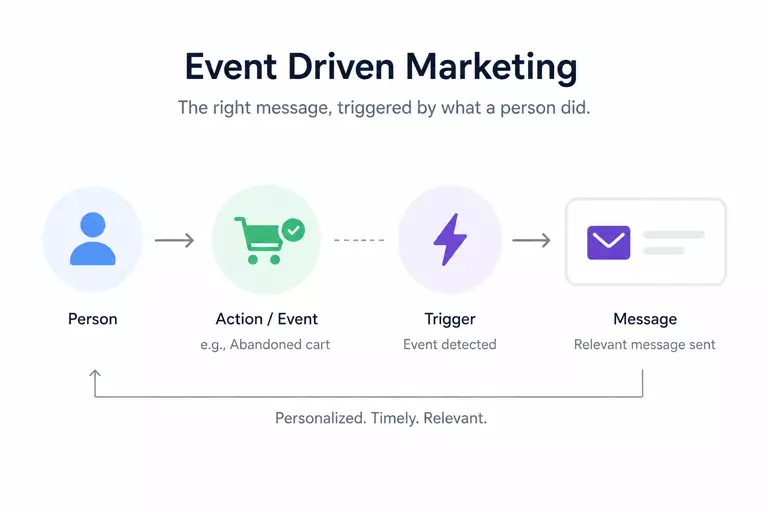
Event-driven marketing is the practice of triggering messages based on what a person actually did, rather than what a calendar says they should receive. The trigger is a behavior (a page view, a feature use, a usage threshold, a signal of intent), and the response is a contextual message sent in the window when that behavior still matters.
This sounds obvious in the abstract, and that is part of the trap. Most teams set up a single welcome email on signup and call it event-driven. A single trigger does not make a system. Event-driven marketing only earns its name when the whole lifecycle behaves this way: every meaningful behavior produces a response, every response is timed against the behavior that produced it, and every message is measurable against a downstream user action, not against an open rate.
Failure 1: the calendar trap
The most common failure mode is the easiest to fall into, because it looks like work. A new founder sets up an onboarding drip. Welcome on Day 0, feature tour on Day 1, tips email on Day 3, case study on Day 7. The list grows. By month two, every contact gets six emails on a fixed schedule regardless of what they actually did inside the product.
The signature of the calendar trap is that the trigger is time, dressed up as user behavior. "Day 3 after signup" is not a behavioral trigger. It is a clock. Two users on Day 3 can be in totally different mental states. One activated the product on Day 1 and is looking for the next move. The other never logged in past the verification email. They get the same message.
What fixes this is a small move: stop triggering on a clock, start triggering on the next thing a user does or fails to do. If a contact has not fired the first_workflow_completed event within 48 hours of signup, that becomes the trigger for the help-with-onboarding email. Not Day 3. In Spreeflo this is a Custom Event trigger in a journey, with a Wait Condition node that waits for the event and a Time Delay node that handles the absence case. The journey itself uses roughly the same number of nodes. The trigger logic is materially different. One waits on the wall clock. The other waits on the user.
Failure 2: the single-shot trigger
The second failure looks like the opposite of the first, but it ends up at the same place. The team sets up one beautiful event-driven flow: a real Custom Event triggers a welcome journey on signup. The journey runs. Then nothing. The contact lives in your database for the next 18 months without another event-driven touch.
A single-shot trigger covers one moment of the lifecycle and lets the rest happen on a newsletter cadence. It is slightly better than pure calendar marketing, but only slightly, because the moments that matter most for conversion and retention almost never happen at signup. They happen at the second login, at the third pricing-page visit, at the fifth time someone opens the dashboard but does not take action, at the moment usage drops to half its prior average. None of these are signup events.
The fix is to think of event-driven marketing as a fabric, not a thread. The lifecycle has dozens of meaningful moments. Each one needs a trigger, a response, and a measurement. Join Segment and Leave Segment triggers are particularly useful here, because they let you express conditions like "contact has visited the pricing page more than twice in the last 14 days and has not upgraded" as a segment, then trigger a journey when a contact joins it. The contact's behavior is what moves them into and out of the segment, which means the segment itself becomes the event surface.
Failure 3: event confetti
The third failure shows up after the team gets excited about events and over-instruments. Every page view fires an event. Every button click fires an event. Every dropdown selection fires an event. The event log fills up, the segments multiply, the journeys branch on signals that look meaningful but do not predict anything useful.
The result is noise. A page view on the pricing page is a different kind of signal than the same user completing a usage milestone. Treating them the same in your trigger logic produces messages that arrive too often and feel disconnected from what the user actually wants. Worse, the team running the system loses the ability to tell which events matter, because the dashboard shows everything firing all the time.
The cleanup move is to separate two questions. First, what should you track? Track liberally. Page views, link clicks, feature usage, declarative data-spree-track attributes on key buttons, all of it. The cost of tracking is low and you will want the history later. Second, what should you trigger on? Trigger conservatively. A trigger should correspond to an action that meaningfully predicts a downstream behavior, not to any click anywhere in the app. In Spreeflo, this often looks like a segment with nested AND/OR conditions ("viewed pricing page at least 3 times in the last 7 days AND has not upgraded AND was last active within 48 hours") and a journey triggered by Join Segment. The segment compresses a lot of raw events into one meaningful state change. The trigger fires on the state change.
Failure 4: the lagging signal
The fourth failure is the most expensive, because it looks fine on paper. The team triggers on the right kind of event, at the right kind of moment, but the event itself is lagging. The save-the-account email fires after the user cancels. The upgrade prompt fires after the user has self-served the upgrade. The re-engagement campaign fires after 90 days of inactivity, which is roughly 89 days after the relationship was actually salvageable.
Lagging signals are seductive because they are easy to detect. Cancellation is a clean event. So is upgrade. So is 90 days of zero activity. The leading signals that would let you act before the outcome are messier: a drop in session frequency, a missed weekly login, a billing-page visit followed by no action, a support ticket about an alternative tool. These require web tracking and the willingness to act on probability rather than certainty.
This is where the Spreeflo SDK earns its keep. A small JS snippet on your site captures page views, custom events fired with Spreeflo.track, declarative tracking through data-spree-track attributes, and atomic mutations on contact attributes with Spreeflo.increment and Spreeflo.decrement. Those become the leading indicators. A contact whose sessions_last_14_days attribute just dropped below half of sessions_prior_14_days is a contact heading toward churn, and the right time to act is now, not in 60 days. A journey with a Cyclic trigger that re-evaluates segment membership weekly catches these contacts on the leading edge of the problem.
See it in Spreeflo
The Custom Event trigger, the Spreeflo SDK, and segments with nested AND/OR are the three primitives that turn an event log into a working event-driven system. They live on the same contact record, so the segment, the trigger, and the message all see the same picture.
What ties all four failures together
The four failures look different on the surface, but they share one underlying error: the team treats events as a feature of the marketing tool, not as a description of the user's state. Once you reframe events as state, the right behavior becomes clearer.
A useful event has three properties. It correlates with a state the user is actually in (intent to upgrade, risk of churn, readiness to refer). The window for influence is still open at the moment it fires (the user has not yet bought, canceled, or moved on). And the response is verifiable against a downstream behavior, not just against an open rate. The third property is the one most teams skip. You do not know if your upgrade email worked because the user opened it. You know it worked because the upgrade-completed event fired in the next 48 hours.
This is also why Check Email Activity and Random Split nodes matter more than they sound. The first lets a journey branch on whether the email was opened or clicked, so the next message is contingent on the previous one's response. The second lets you A/B test the timing of the trigger itself, not just the copy. Almost no small team A/B tests timing. They test subject lines. Timing has a bigger lift.
The small-team case for Spreeflo over Customer.io and Klaviyo
Customer.io and Klaviyo are the obvious incumbents for event-driven marketing. They are also priced and tooled for teams much larger than the ones reading this piece. For a solopreneur or a five-person team picking between them and Spreeflo, three differences matter most for the failure modes above.
Price first. Spreeflo runs roughly 2-3x more affordable than Mailchimp, and the gap to Customer.io and Klaviyo is wider again. Billing is per marketing contact, and non-marketing contacts (anonymous SDK visitors, identified contacts you are not actively automating against) are stored for free. For a small team that is collecting visitor data faster than it is enabling marketing journeys, that distinction is the difference between a $20 monthly bill and a four-figure one.
Second, the SDK, email, web push, and web analytics all live on one contact record. Customer.io leans on integrations with Mixpanel and similar product-analytics tools to feed behavioral data in. The other incumbents in this space tend to price their non-email channels (SMS, push, on-site) as separate add-ons or higher tiers. With Spreeflo, the same Spreeflo.track call that fires a custom event also updates the contact record that drives the segment that fires the journey that may close with a web push. There is no syncing layer in the middle, which removes a whole class of latency bugs and event-mismatch bugs that a small team cannot afford to debug.
Third, the bundling is what actually fixes failure 3 and failure 4 in this piece. Event confetti gets cleaner when the segment, the trigger, and the message all see the same picture, because there is only one picture. Lagging signals get caught earlier when the analytics view and the journey view share a contact record, because a segment like "session frequency dropped by half versus the prior period" is a few clicks away, not a Zapier flow away. Stitching this together across three vendors can work at scale. It does not work for a team of one.
Build this in Spreeflo
Spreeflo gives founder-led teams the event tracking, behavior-based segmentation, journey builder, and web push to run event-driven lifecycle marketing without the enterprise price tag. It does roughly 80% of what Customer.io, Klaviyo, and Mailchimp do, at 2-3x the affordability, on one platform with one contact record.
Common questions
How is event-driven marketing different from marketing automation?
Marketing automation is the broader category: anything that sends a message without a human pressing send. Event-driven marketing is a subset that triggers on user behavior in close to real time. Most marketing automation in the wild is calendar-driven (welcome on Day 0, tips on Day 3, newsletter every Tuesday). Event-driven marketing replaces the clock with the user's behavior as the trigger.
Do you need a developer to set up event-driven marketing?
Less than most teams assume. The SDK is a single snippet at the top of your site, and declarative tracking with data-spree-track attributes lets a non-developer instrument new events by adding HTML attributes to buttons. You will need a developer for the initial install and for any event that has to fire server-side (purchase completed, subscription upgraded). Day-to-day operation is closer to a marketer's job than an engineer's.
What is the smallest event-driven setup worth building first?
One leading indicator of intent (most commonly: visited the pricing page more than once in the last 7 days), one leading indicator of disengagement (most commonly: sessions dropped by more than half versus the prior period), and one activation event tied to your product's "aha" moment. Three segments, three journeys, three measured outcomes. That setup will produce more lift than most 12-journey enterprise builds, because every piece earns its place.
When does a time-based trigger still beat a behavioral one?
For renewals, billing reminders, and any compliance-driven message, the calendar is the right trigger, because the underlying event is itself time-based (the subscription anniversary, the trial expiration date, the legal disclosure window). For anything that depends on user intent or engagement, the calendar is almost always a worse trigger than a behavioral signal, even a noisy one.