Hi Lina,
You've exported 12 reports this week, so scheduled exports will save you the most time.
The link below takes you straight there. Reply to this email if anything gets in the way, and I'll help.
Turn signups, clicks, page visits and silence into the right email, browser notification or popup, sent at the right moment. You set it up once. It runs for every customer after that.Turn signups, clicks, page visits and silence into the right email, browser notification or popup, sent at the right moment.
Free plan, no card needed14-day trial of every feature
Step 1 of 6. Trigger: Joins segment "Trial users"
It works best on a laptop. Sign up free now and open the builder there, or open it here anyway.

: 185% higher open rates

: 220% higher open rates

: 36% additional conversion rate boost
Campaigns and journeys share the same builder, the same branching and the same channels. The difference is who gets in.
When it starts, it captures everyone who matches right then and takes only them through to the end. People who join tomorrow aren't included. Start it now.
Good for
It runs continuously. Anyone who meets a trigger enters automatically, whether that's today or next spring. Build it once and it greets every future customer.
Good for
Choose how it starts, what it sends and what happens if nobody responds. Then open it in the real builder and make it yours.
It starts when someone…
Send it to…
First, send them…
Then wait…
If they haven't responded…
Free plan, no card needed14-day trial of every feature
Triggers decide who enters. Processes decide which path they take. Actions do the work. Every journey is built from these, on one visual canvas.
Add to Audience
Starts when someone joins your contact list, however they got there.
e.g.A welcome series for every new signup.
Join Segment
Starts when someone newly matches a saved segment.
e.g.Joins "High-intent visitors": alert yourself.
Leave Segment
Starts when someone stops matching a segment.
e.g.Drops out of "Active users": start a win-back.
Email Action
Starts when someone opens, clicks or replies to an email.
e.g.Clicked the launch email: move them to a high-intent path.
Criteria Match
Starts when someone matches conditions you set inside the trigger.
e.g.In Germany and tagged "newsletter": send the German series.
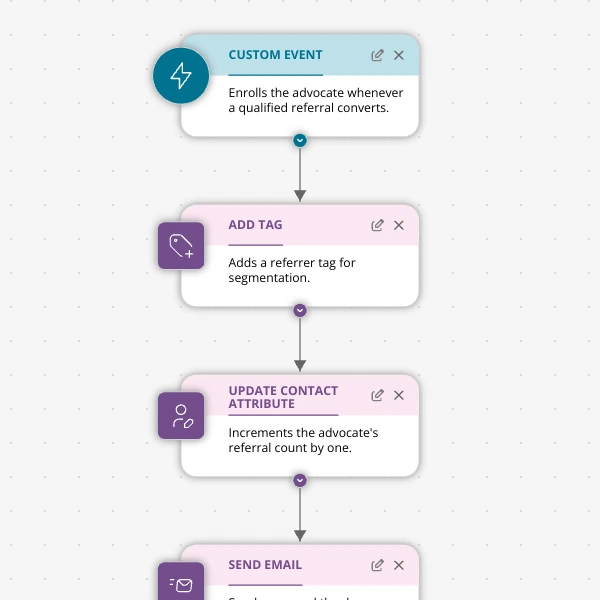
Custom Event
Starts when your app or site sends an event, with optional property filters.
e.g.purchase over $100: send a thank-you with a coupon.
Added Tag
Starts when a tag is applied.
e.g.Tagged "interested-in-demo": send your calendar link.
Removed Tag
Starts when a tag comes off.
e.g."trial-user" removed: start paid onboarding.
Cyclic
Runs on a schedule for everyone who matches at that moment.
e.g.Every Monday at 8am: the weekly digest.
Time
Starts on each contact's own date: before it, on it or after it.
e.g.7 days before renewal_date: a renewal reminder.
Form Submission
Starts when someone submits a form you choose.
e.g."Contact sales" form: notify yourself and start a nurture.
Object Updated
Starts when a custom object changes, for every contact linked to it.
e.g.A subscription's status changes: route by the new status.
Related to Object
Starts when a contact is linked to an object.
e.g.Linked to a subscription: start onboarding for that plan.
Unrelated from Object
Starts when a contact is unlinked from an object.
e.g.Unlinked from a subscription: start a win-back.
If/Else
Two paths: matches the condition, or doesn't.
e.g.VIPs get the white-glove email.
Multi-way Split
Up to 10 named paths, checked top to bottom, plus an else.
e.g.Route by plan: Free, Pro, Team, everyone else.
Check Email Activity
Branches on how someone handled a specific email.
e.g.Clicked: demo invite. Opened only: a reminder.
Check Web Push Activity
Branches on clicks, dismissals or delivery of a notification.
e.g.Dismissed the flash-sale push: try email instead.
Check Form Activity
Branches on whether a form was shown, submitted or dismissed.
e.g.Saw the popup but didn't submit: follow up by email.
Random Split
Splits people by a percentage, anywhere from 1% to 99%.
e.g.Test two subject lines, or keep a 10% holdout.
Merge
Brings branches back together into one path.
e.g.Rejoin both paths before a final tag.
Send Email
Sends a marketing email from a template, the editor or AI.
e.g.Every step of a nurture.
Send Web Push
Sends a browser notification, even when they're not on your site.
e.g.Flash sale, back in stock, new post.
Popup Form
Shows a popup form the next time they're on your site.
e.g.An offer on pricing pages, at most twice a week.
Add Tag
Labels contacts for later.
e.g.Tag everyone who opened the launch email.
Remove Tag
Takes a label off.
e.g.Remove "cart-abandoned" once they buy.
Update Contact Attribute
Sets, appends, increments or clears a field.
e.g.Set onboarding_stage to "activated".
Send Internal Email
Emails your team, with the contact's details.
e.g."New high-intent lead" alert.
Update Email Subscription Status
Marks someone subscribed, unsubscribed or non-subscribed.
e.g.Confirm a double opt-in.
Time Delay
Waits a set number of hours or days.
e.g.Wait 2 days before the next email.
Wait Condition
Waits until something happens or a timeout ends, whichever comes first.
e.g.Wait up to 24 hours for a purchase.
Webhook
Sends the contact's data to any URL.
e.g.Push qualified leads to your CRM.
No double enrollment
Someone who's already in a journey is never enrolled again until they finish, so nobody gets duplicate or out-of-order emails.
Send only once
On by default for emails, so a repeat run never sends the same email twice.
Re-enrollment per trigger
Choose "once ever" or "every time they qualify", trigger by trigger, in the same journey.
Waits that let go
Wait Condition moves people on the moment something happens, or when the timeout ends. Nobody gets stuck.
Real A/B tests
Random Split sends anywhere from 1% to 99% down one path, holdout groups included.
The right tool for receipts
Messages that must go out every single time run through the transactional API, not a journey.
Pull anything you know about a contact into subject lines and copy. Or let AI write a line for each person at send time, in your brand voice.
HamburgTeam trialExported 12 reports this week
Hi Lina,
You've exported 12 reports this week, so scheduled exports will save you the most time.
The link below takes you straight there. Reply to this email if anything gets in the way, and I'll help.
Hi Marcus,
It's been 9 days since you last logged in, so here's the one thing worth 2 minutes of your time this week.
The link below takes you straight there. Reply to this email if anything gets in the way, and I'll help.
Hi Aisha,
You've looked at pricing 3 times this week, so here's what each plan adds, in one minute.
The link below takes you straight there. Reply to this email if anything gets in the way, and I'll help.
Subject:  {{ contact.first_name | default: "Hey" }}, {{ ai.subject_hook }}
Preview:  {{ ai.preview_line }}

Hi {{ contact.first_name | default: "there" }},

{{ ai.opening_line }}

The link below takes you straight there. Reply to this email if anything
gets in the way, and I'll help.

[ Open YourApp ]contact.data you already store about each contact, like name, plan or city.ai.written for each person at send time, from your prompt and brand voice.Prompt forai.opening_line
One sentence that connects what this person did most recently to the feature in this email. Plain and friendly, no hype.
Add one snippet and page views, clicks and custom events become triggers. Reach people on your site with a popup, off it with a browser notification, and in their inbox when they're most likely to read it.
Tell Spreeflo's AI assistant what you want in plain English. It drafts the trigger, the branches and the emails, then waits for your OK. The assistant is included on every plan, Free included.
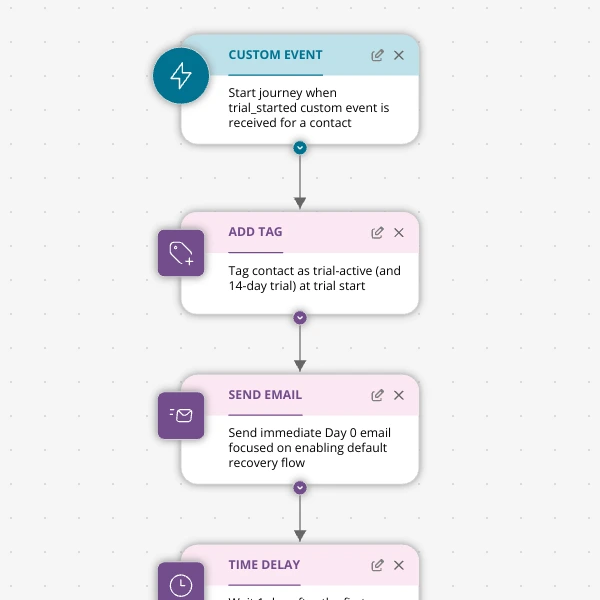
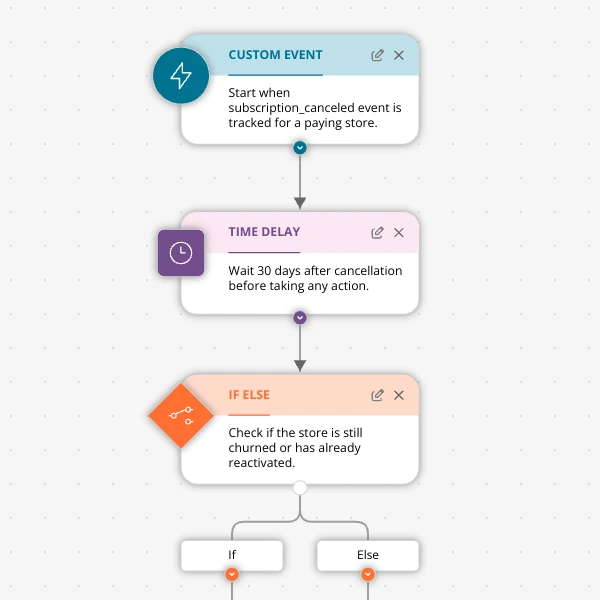
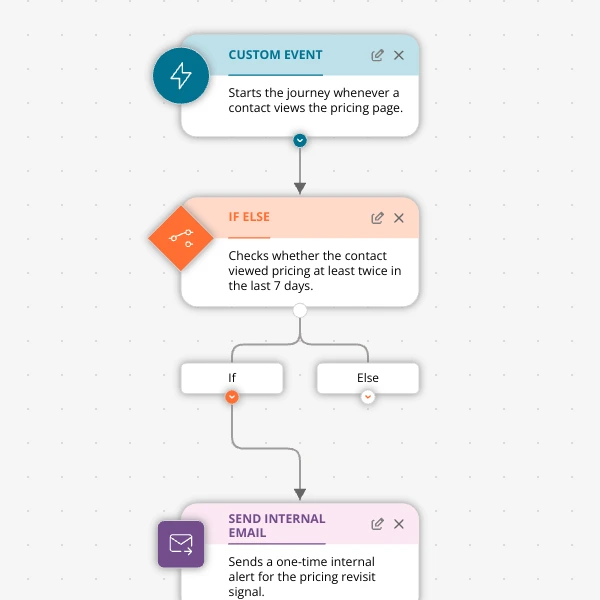
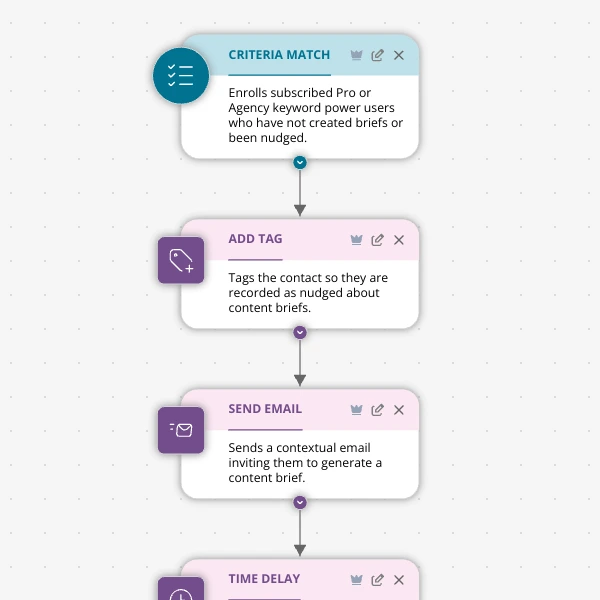
When someone starts a trial and hasn't created a project within 2 days, send a friendly nudge. If they still haven't after 2 more days, email me.
Here's a draft with 7 steps: a trigger, two waits, two checks, a nudge email and an alert to you. Nothing changes until you approve it.
Connect Claude, ChatGPT, Claude Code or Cursor to Spreeflo's MCP server. Add one URL, sign in to Spreeflo and approve, with no API key to paste. Then build journeys from wherever you already work.
claude mcp add --transport http spreeflo https://mcp.spreeflo.com/mcpThen run /mcp in Claude Code, pick spreeflo and choose Authenticate.
How the MCP server worksEvery playbook is a complete journey with a step-by-step walkthrough of why each node is there. Pick one, change the words, press start.
Start from a template and your first campaign can be running in under 10 minutes.
No step caps. No charge for contacts you don't market to. The 14-day trial includes every feature on this page.
$13/month billed yearly
$160/year$16 month to month
Start free$20/month billed yearly
$240/year$24 month to month
Start freeEverything in Starter, plus:
| Spreeflo |  Mailchimp Mailchimp |  Brevo Brevo |  Klaviyo Klaviyo |  Customer.io Customer.io | |
|---|---|---|---|---|---|
| Automation on the entry plan | Journey builder, no step caps | Journeys limited to 4 steps | No meaningful automation until Standard | Flows on every paid plan | Full visual journeys |
| Branching on behavior | Yes | From Standard | From Standard | Yes | Yes |
| What you're billed for | Marketing contacts only. Non-marketing contacts are free | All contacts, including unsubscribed | Email volume (contacts unlimited) | Active profiles, including ones you never email | Profiles (including inactive) plus email volume |
| Estimated monthly price at about 10,000 contacts | $76 (Professional, monthly) | More than $135 | More than $130 | More than $175 | More than $145 |
As of August 2026. Prices and limits change, so check each vendor's pricing page. See the full comparisons
Already on another marketing automation provider? We port your contacts, segments, templates and automations across for you — at no cost.
 Brevo
Brevo Customer.io
 Mailchimp
 Resend
 Loops.soand more
Our leads and customers come from all kinds of regions and backgrounds. Executing personalized engagement for everyone would have required a dedicated marketing team. Spreeflo's web tracking for geo location and personalization made it easy to convey our unique offerings across Europe.
Before Spreeflo, our emails went straight to spam. Now, with their intelligent marketing and personalization, we're booking demo calls, driving Shopify app installs, and acquiring leads at a fraction of our usual ad spend.
Spreeflo helped grow our conversion rate by >30% by orchestrating onboarding marketing emails. We are now also finding early success with retention using Spreeflo to send automated win-back emails to our customers.
Short answers. The help docs go deeper.
A campaign takes a snapshot of the contacts who match when it starts and markets only to them, start to finish. A journey runs continuously: anyone who meets its trigger enters automatically, whenever that happens. Both use the same builder, the same branching and the same actions. Use a campaign for a one-off message to a known group, like a price change. Use a journey for anything that should happen to every future customer, like a welcome series. Other tools call journeys customer journeys, flows or workflows.
A drip campaign is a series of messages sent automatically over time, spaced out by delays and adjusted by what each person does. It's the most common form of email automation. In Spreeflo you build one as a journey: a trigger, then emails, browser notifications or popups separated by Time Delay or Wait Condition steps, with branches for people who click, ignore or convert.
There are 14 triggers: being added to your audience, joining or leaving a segment, opening, clicking or replying to an email, matching criteria you define, a custom event from your app or site, a tag being added or removed, a recurring schedule, a date on the contact's record, a form submission, and custom objects changing or being linked to or unlinked from a contact. One journey can have several triggers.
Only if you want them to. Each trigger has its own re-enrollment setting: off means once ever, on means every time they qualify. Either way, someone who's still in the journey is never enrolled a second time, so nobody gets duplicate or interleaved messages. For messages that must go out every single time, like receipts, use transactional email through the API.
Yes. Random Split sends a percentage you choose, from 1% to 99%, down one path and the rest down the other, so you can test subject lines, channels or timing, or keep a holdout group. Check Email Activity then lets you branch on who opened or clicked.
Not for email journeys. Contacts, forms, tags, segments and the builder are all no-code. To trigger journeys from what people do on your site, you add one script tag. To send events from your app, you call Spreelytics.track or the API.
Campaigns, journeys and the automation builder are on Starter (from $13/month billed yearly, or $16 month to month). Professional (from $20/month billed yearly, or $24 month to month) adds browser notifications, popups and webhooks as journey steps, triggers and segments based on web activity and custom events, AI personalization, AI send-time optimization and custom objects. The 14-day free trial includes everything.
Yes. Describe what you want to the in-app AI assistant and it drafts the journey for you to review. Nothing changes until you approve it. The assistant is on every plan, and journeys start on Starter. You can also connect Claude, Claude Code or Cursor through Spreeflo's MCP server.
Yes. We'll port your contacts, segments, templates and automations for you at no cost. Slots are limited, so get in touch early.
You pay for marketing contacts, the people you actually market to. Non-marketing contacts are free and unlimited, and each paid plan lets you send up to 10 times your contact limit in emails every month. The pricing page shows the exact tiers.
Start from a playbook, change the words, press start. The Free plan needs no card, and the 14-day trial includes every feature.
Already have an account? Sign in