
Drag-and-drop email builder
Good-looking emails in your brand. No designer, no HTML.
Start from 290+ templates, add your logo and colors, and check it on desktop and phone. Then send it to a segment, drop it into a journey, or trigger it from your app with one API call.
Free plan, no card needed14-day trial of every feature
Live preview
SpreefloWelcome to Spreeflo, MayaYour first win is a few minutes away.
The builder is made for a bigger screen
It works best on a laptop. Sign up free now and open the builder there, or open it here anyway.
Templates
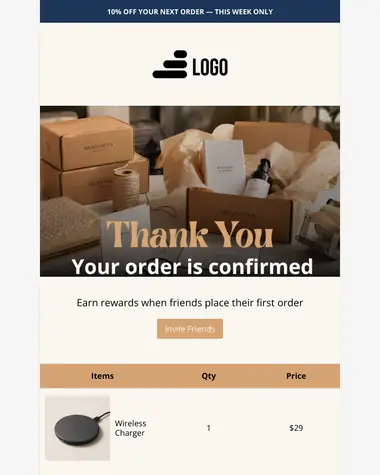
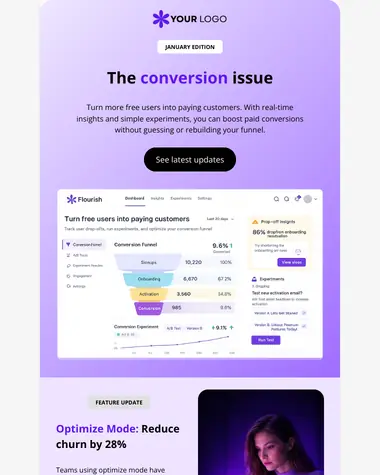
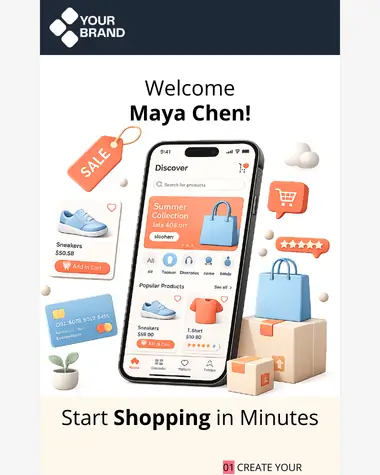
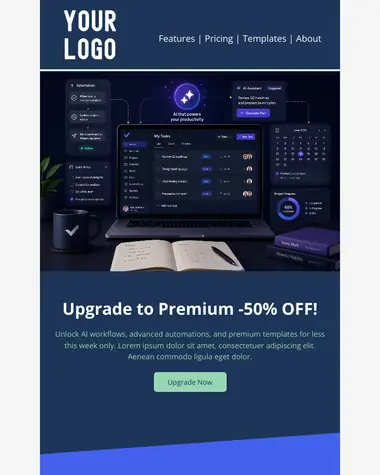
Browse all templates Start from 290+ designs, not a blank page.
Pick one close to what you need, then change the logo, colors and words. The layout already works on phones.



The builder
Nine blocks, eight layouts, zero code.
Drag in what you need, tune it for phones, and save the pieces you reuse. Already have HTML? Bring it.
Step 1 of 5


Pick a layout.
Eight column layouts, from one column to four. Columns stack on phones.
Every inbox
Check it on the phone in your hand.
Switch between desktop and mobile while you build. Every layout reflows for small screens, and you decide what changes.
Showing: Welcome
- 1Columns stack on narrow screens.
- 2Font sizes and padding you set for mobile apply only on mobile.
- 3Blocks you hide on mobile stay hidden.
Under the hood, Spreeflo writes table-based HTML with inline styles, the format email clients expect.
Test it before your list does
Every email has desktop and mobile previews in the builder, so you can check both before anything goes out.
Try it in the builderPersonalization
Personal to every reader. Even the ones with half a profile.
Pull any contact detail into the subject line, preview text or body.

HamburgTeam trialExported 12 reports this week
Hi Lina,
You've exported 12 reports this week, so scheduled exports will save you the most time.
The link below takes you straight there. Reply to this email if anything gets in the way, and I'll help.
Hi Marcus,
It's been 9 days since you last logged in, so here's the one thing worth 2 minutes of your time this week.
The link below takes you straight there. Reply to this email if anything gets in the way, and I'll help.
Hi Aisha,
You've looked at pricing 3 times this week, so here's what each plan adds, in one minute.
The link below takes you straight there. Reply to this email if anything gets in the way, and I'll help.
Subject:  {{ contact.first_name | default: "Hey" }}, {{ ai.subject_hook }}
Preview:  {{ ai.preview_line }}

Hi {{ contact.first_name | default: "there" }},

{{ ai.opening_line }}

The link below takes you straight there. Reply to this email if anything
gets in the way, and I'll help.

[ Open YourApp ]contact.data you already store about each contact, like name, plan or city.ai.written for each person at send time, from your prompt and brand voice.
Prompt forai.opening_line
One sentence that connects what this person did most recently to the feature in this email. Plain and friendly, no hype.
AI that drafts, you approve
Describe the email. Approve the draft.
Tell Spreeflo's AI assistant what you want to send. It writes the subject line, preview text and body. From your dashboard, it waits for your OK before anything changes.
- You
Write a welcome email for new trial users. Friendly, three short paragraphs, one button to the setup guide.
- Spreeflo AI
Here's a draft: a subject line, preview text, three short paragraphs and a button to your setup guide. Nothing changes until you approve it.
Prefer your own agent?
Connect Claude, ChatGPT, Claude Code or Cursor to Spreeflo's MCP server. Add one URL, sign in to Spreeflo and approve, with no API key to paste. Your agent can then create and edit email templates in your workspace.
claude mcp add --transport http spreeflo https://mcp.spreeflo.com/mcpThen run /mcp in Claude Code, pick spreeflo and choose Authenticate.
How the MCP server worksSend
One builder. Three ways to send.
Send to a segment today, put an email inside a journey that greets every new signup, or fire a receipt from your own code. All three are designed in the same editor, with the same blocks and variables.
To a segment
Pick who gets it and send. Test two versions with a random split and compare the results.
- A/B testing
- AI send-time optimization
Inside a journey
Drop it into a Send Email step and it reaches every new signup who qualifies, this week or next year. Send only once is on by default, so nobody gets it twice.
From your app
Design receipts, resets and confirmations in the same builder, then send them from your backend with one API call.
Transactional email
Receipts and resets your team can edit without a deploy.
Design transactional emails in the builder, then send them from your backend with one API call.
Uses a template you designed in Spreeflo. Almost always the right choice, because the wording can change without a deploy.
curl -X POST https://api.spreeflo.com/1.0/transactional/emails/send-template \
  --header 'Authorization: Bearer <YOUR_API_KEY>' \
  --header 'Content-Type: application/json' \
  --data '{
    "message": {
      "templateId": "<TEMPLATE_ID>",
      "fromEmail": "orders@yourdomain.com",
      "fromName": "Spreeflo",
      "to": [
        { "email": "customer@example.com", "name": "Maya", "type": "to" }
      ],
      "vars": [
        { "key": "order_id", "value": "A-1042" },
        { "key": "item", "value": "Ceramic mug × 2" },
        { "key": "total", "value": "$36.00" },
        { "key": "ship_date", "value": "Friday" }
      ]
    }
}'await fetch('https://api.spreeflo.com/1.0/transactional/emails/send-template', {
method: 'POST',
headers: {
Authorization: `Bearer ${process.env.SPREEFLO_API_KEY}`,
'Content-Type': 'application/json',
},
body: JSON.stringify({
message: {
templateId: '<TEMPLATE_ID>',
fromEmail: 'orders@yourdomain.com',
fromName: "Spreeflo",
to: [{ email: 'customer@example.com', name: 'Maya', type: 'to' }],
vars: [
{ key: 'order_id', value: "A-1042" },
{ key: 'item', value: "Ceramic mug × 2" },
{ key: 'total', value: "$36.00" },
{ key: 'ship_date', value: "Friday" }
],
},
}),
});Subject: Order {{ var.order_id }} confirmed
Preview: Ships {{ var.ship_date }}. Here's your receipt.
Thanks for your order
Hi {{ contact.first_name | default: "there" }}, your order {{ var.order_id }} is confirmed and ships {{ var.ship_date }}.
{{ var.item }} {{ var.total }}
Total {{ var.total }}
[ Track your order ]
Questions about your order? Reply to this email and we'll sort it out.var.Sent by your code in the request.contact.Looked up by Spreeflo from the recipient's address.
Simulated response. Nothing is sent from this playground.
{
  "emailId": "968333c3-d13b-479a-a62c-cee41162812f",
  "email": "customer@example.com",
  "status": "queued"
}- queued
- sent
Sends HTML or text straight from your code, for content your system generates.
curl -X POST https://api.spreeflo.com/1.0/transactional/emails/send \
  --header 'Authorization: Bearer <YOUR_API_KEY>' \
  --header 'Content-Type: application/json' \
  --data '{
    "message": {
      "subject": "Order {{ var.order_id }} confirmed",
      "html": "<p>Hi {{ contact.first_name | default: \"there\" }},</p><p>Order {{ var.order_id }} is on its way.</p>",
      "fromEmail": "orders@yourdomain.com",
      "to": [{ "email": "customer@example.com", "type": "to" }],
      "vars": [{ "key": "order_id", "value": "A-1042" }]
    }
}'Sends a MIME message you've already built, as it is.
# 1. Get an upload URL, then PUT your .eml file to it (see Attachments below)
# 2. Send using the key it returned

curl -X POST https://api.spreeflo.com/1.0/transactional/emails/send-raw \
  --header 'Authorization: Bearer <YOUR_API_KEY>' \
  --header 'Content-Type: application/json' \
  --data '{
    "message": {
      "rawMessageKey": "<UPLOAD_KEY>",
      "fromEmail": "orders@yourdomain.com",
      "fromName": "Your Store",
      "to": ["customer@example.com"]
    }
  }'
Anyone can receive one.Recipients don't need to be marketing contacts. A new address is saved as a non-marketing contact, and those are free.
Unsubscribes don't block receipts.Someone who left your newsletter still gets their receipt. Transactional email has its own opt-out, and Spreeflo respects it.
Your code sends a few values.Pass the order number with
var. Spreeflo fills in the contact's name, your unsubscribe link and the date.Attach the invoice.Upload the file, then reference its key when you send.
Look up any send.Every send returns an ID. Use it to check delivery, opens and clicks, or to see the email exactly as it went out.
Get the request from the editor.Press Send in the template editor to see a ready-made request with your template's ID filled in.
Deliverability
Get to the inbox. Stay out of spam.
Authenticate your domain in three copy-and-paste steps. Spreeflo takes care of the headers, bounces and link tracking that inbox providers look at.
Set up your domain once
Add your sending domain. We recommend a subdomain, like mail.yourdomain.com.
Copy the records. Paste the SPF, DKIM, MX and DMARC records into your DNS provider.
Let Spreeflo check. Once it's verified, add as many sender addresses on that domain as you like.
Handled for you
One-click unsubscribe.
Spreeflo adds the one-click unsubscribe header that Gmail and Yahoo require from bulk senders.
Bounce suppression.
In campaigns and journeys, addresses that bounce are suppressed automatically, so you stop sending to inboxes that don't exist.
Branded link domains.
Tracked links use your own domain.
Reputation protection.
IP and domain reputation protection comes with every paid plan.
Receipts still arrive.
A marketing unsubscribe never blocks a receipt. Transactional email has its own opt-out.
UTM tags.
Tracked links in campaigns and journeys get a utm_content tag automatically, or you set your own.

Flyweight AI: 42% avg. email open rate. Read their story
Pricing
The builder, the templates and transactional email, from $13 a month, billed yearly.
One bill for marketing and transactional email. You pay for the contacts you market to. Everyone else, including customers who only ever get receipts, is free to store.
Starter
$13/month billed yearly ($160/year)
$16 month to month
Start free- Drag-and-drop email builder
- 290+ templates
- Marketing and transactional email
- Spreeflo API
- Campaigns and journeys
- Segmentation and A/B testing
- Unlimited email accounts
- Deliverability optimizations and reputation protection
- AI assistant
Professional
$20/month billed yearly ($240/year)
$24 month to month
Start freeEverything in Starter, plus:
- AI variables written for each reader
- Custom tone of voice
- AI send-time optimization
- Custom objects in your emails, like
{{ order.total }} - Browser notifications, popups and webhooks
- Teams with unlimited seats
One free trial includes everything on both plans.
Starter and Professional include 10 times your contact limit in emails each month, marketing and transactional combined. See full pricing
| Spreeflo |  Mailchimp Mailchimp |  MailerLite MailerLite |  Brevo Brevo |  Loops Loops | |
|---|---|---|---|---|---|
| Marketing and transactional email on one plan | Yes, from Starter ($13/month billed yearly) | No. Transactional (Mandrill) is an add-on that needs a Standard plan, then $20 per block of 25,000 emails | No. Transactional is a separate product, MailerSend, billed separately | Yes, included | Yes, included |
| Estimated monthly price at about 10,000 contacts | $52 (Starter, billed monthly) | More than $135 | $89 (Comfort), plus MailerSend for transactional | More than $130 (Standard) | $99 (5,000 to 10,000 contacts) |
| Email templates in the library | 290+ | 130+ on its templates page | Not published | 40+ on its templates page | About 16 on its templates page |
| What you're billed for | Marketing contacts only. Non-marketing contacts are free | All contacts, including unsubscribed | Active subscribers | Emails sent (contacts unlimited) | Subscribed contacts |
As of June 2026. Prices and limits change, so check each vendor's pricing page. See the full comparisons
Free migration onto Spreeflo
Limited slots availableAlready on another marketing automation provider? We port your contacts, segments, templates and automations across for you — at no cost.
 Brevo
Brevo Customer.io
 Mailchimp
 Resend
 Loops.soand more
Stories
Real teams, real numbers.
Before Spreeflo, our emails went straight to spam. Now, with their intelligent marketing and personalization, we're booking demo calls, driving Shopify app installs, and acquiring leads at a fraction of our usual ad spend.
- higher open rates
- 220%
- more responses generated
- 7.5x
- avg. email open rate
- 42%

Our leads and customers come from all kinds of regions and backgrounds. Executing personalized engagement for everyone would have required a dedicated marketing team. Spreeflo's web tracking for geo location and personalization made it easy to convey our unique offerings across Europe.
- higher open rates
- 185%
- more responses generated
- 5x
- reduction in manual work
- 90%

Spreeflo helped grow our conversion rate by >30% by orchestrating onboarding marketing emails. We are now also finding early success with retention using Spreeflo to send automated win-back emails to our customers.
- additional conversion rate boost
- 36%
- more clicks generated
- 10x
- person-hours saved per week
- 35
FAQ
Still stuck? Ask us Questions founders ask before their first send.
Short answers. The help docs go deeper.
What is a drag-and-drop email builder?
A drag-and-drop email builder lets you design an email by placing blocks, like headings, images and buttons, into a layout instead of writing HTML. Spreeflo's builder has nine content blocks and eight column layouts, and it turns your design into the table-based HTML with inline styles that email clients expect. You can preview it on desktop and mobile before you send.
Are Spreeflo emails mobile-responsive?
Yes. Columns stack on narrow screens, and you can set font size, padding and alignment separately for mobile, or hide a block on phones. Preview both versions in the builder, and send yourself a test before it goes to your list.
Can I import my own HTML templates?
Yes. Import an existing HTML template and edit it in the code editor, or paste HTML into a code block inside a drag-and-drop email.
How many templates are there, and what do they cost?
There are 290+ templates, grouped by industry, use case and season, from SaaS onboarding to order confirmations. Browse them at spreeflo.com/templates and open any of them in the builder without signing up. They're included on every plan that has the email builder.
What's the difference between marketing and transactional email?
Marketing email goes to people who agreed to hear from you: newsletters, announcements and automated journeys, and they can unsubscribe. Transactional email is sent because something happened, like an order, a password reset or an invoice, and goes to one person. In Spreeflo you design both in the same builder. A marketing unsubscribe never blocks a receipt, because transactional email has its own opt-out.
How do I send a transactional email with the API?
Design the email as a transactional template, then call POST /transactional/emails/send-template with the template ID, a verified sender address, the recipient and any values your code supplies, like an order number. Spreeflo fills in contact details and system values, renders the design, and returns an email ID you can use to check delivery, opens and clicks. The API is on Starter and up.
How does personalization work?
Every email can pull contact details into the subject line, preview text and body with Liquid, for example {{ contact.first_name | default: "there" }}. The default is the fallback, so a contact with no first name reads "Hi there" instead of "Hi ,". On Professional, AI variables write a line for each reader at send time from a prompt you write, and Generate Preview shows you the result for any contact first.
Can AI write my emails?
Yes. Describe the email to the in-app AI assistant and it drafts the subject line, preview text and body for you to review. You can also connect Claude, Claude Code or Cursor through Spreeflo's MCP server to create and edit templates. Sending always needs a person.
How do I keep my emails out of spam?
Send from your own domain. Add the SPF, DKIM, MX and DMARC records Spreeflo gives you. Spreeflo adds one-click unsubscribe headers and suppresses bounced addresses in campaigns and journeys automatically. The rest is sending people what they signed up for.
Which plan do I need?
The email builder, templates, marketing and transactional email and the API are on Starter (from $13/month billed yearly, or $16 month to month). Professional (from $20/month billed yearly, or $24 month to month) adds AI variables, custom tone of voice, AI send-time optimization, custom objects in your emails, and browser notifications, popups and webhooks. The 14-day free trial includes everything.
Can you move my templates from Mailchimp or another tool?
Yes. We'll port your contacts, segments, templates and automations from Mailchimp, Brevo, Customer.io, Loops, Resend and more at no cost. Slots are limited, so get in touch early.
Pick a template tonight. Send it tomorrow.
Add your logo and colors, check it on your phone, and press send. The Free plan needs no card, and the 14-day trial includes every feature.
Already have an account? Sign in