Email marketing works best when your messages feel personal, relevant, and timely. Spreeflo leverages AI to help you scale outreach while maintaining personalization, but getting consistent and accurate AI-generated copies can sometimes be challenging. This article explains how Spreeflo generates copies for AI variables and provides actionable techniques to optimize your results for hyper-personalized emails.
How Spreeflo Generates AI Outputs
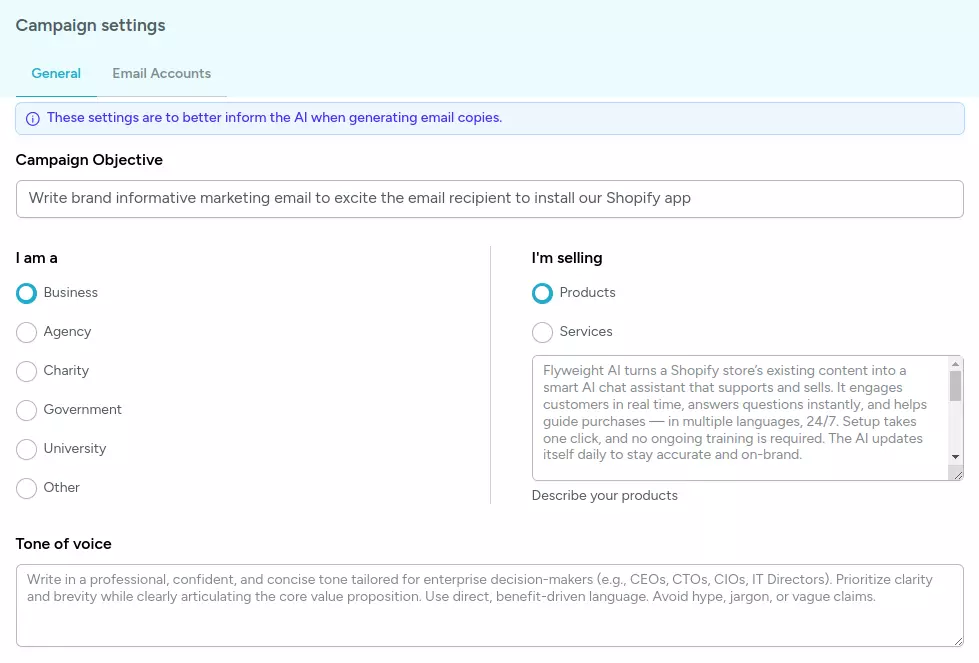
Each AI variable in Spreeflo relies on several inputs to generate email content that is both relevant and engaging. Understanding these inputs will help you guide the AI more effectively:
1. Prompt
The prompt is the instruction you give to the AI to generate content. A well-crafted prompt provides context, sets expectations, and guides the AI's behavior. Specificity is key here: the more detailed your prompt, the more focused and accurate the AI's output will be.
2. Campaign/Journey Objective
Your objective—whether it's booking demo calls, promoting app installs, or proposing referral partnerships—directly influences the tone, structure, and call-to-action in AI-generated content. Clear objectives help the AI tailor messages to achieve your desired outcomes. You can define the objective in Campaign/Journey Settings.
3. Tone of Voice
The tone of your emails is essential for engagement. Spreeflo can generate content in different tones, from formal and professional to casual and friendly. Explicitly specifying the tone ensures the AI aligns with your brand voice. You can define the tone of voice in User Settings or Campaign Settings. If no tone of voice is provided specifically for the campaign, then Spreeflo will default to the tone of voice defined in User Settings.
4. Who You Are and What You Sell
Finally, the AI needs clarity about you (the sender) and your product or service. Precise descriptions help prevent confusion between sender and recipient and make personalization more accurate. You can define this setting in User Settings or Campaign Settings. If setting is provided specifically for the campaign, then Spreeflo will default to the setting defined in User Settings.
Techniques for Generating Consistent and Accurate Outputs
Here are practical tips to get the most out of Spreeflo's AI variables:
1. Use Clear and Consistent Terminology
Avoid ambiguity in how you describe yourself and your recipients. For example, if both are referred to as "agencies," the AI may confuse who is doing what. Use mutually exclusive and consistent terminology. E.g. assume the campaign objective is proposing referral partnerships between yourself (a web dev agency) and your recipients (marketing agencies), then you can describe yourself as a web dev agency and your recipients as potential referral partners.
2. Outline Sentences for AI Variables
When using AI variables to complete a sentence, specify the sentence structure in the prompt.
Example:
Imagine you are pitching stories to a guest post to a journalist or editor. You have an AI variable called "describe_audience" to call out specifically the niche audience that the journalist typically target
"I thought your {{describe_audience}} readers might find this angle interesting."
Prompt:
"
Using the web summary of the media company's website: {{ website_summary }}, infer the type of audience that are targeted by their content which can also be served by our app. Respond only with the audience name, nothing else. Must all be in lower case. Must not end with a period ".".
Example output:"SaaS founders".
Must be phrased such that it follows naturally when injected as audience_type within "[audience_type] audience". Must not end with a period ".".
"
If the output must start with a capital letter, end with a period, or avoid punctuation, explicitly state this in the prompt.
Example:
Prompt:
"Must all be in lower case. Must not end with a period "."."
4. Be Specific in Prompts
Generic prompts often lead to inconsistent outputs. Include precise details about your product, target audience, or use case.
Example:
Instead of: "Write about our app"
Use: "Write a 2-sentence email explaining how our Shopify analytics app helps e-commerce teams increase conversion rates."
5. Use Strong Guidance ("MUST")
Use decisive language like "MUST" to instruct the AI clearly. You can also warn the AI about unacceptable outputs.
Example:
"You MUST use the web summary to reference the recipient's recent product launch. Your response is invalid if you do not reference the recipient's recent product launch."
6. Specify Output Length
Indicate the number of sentences or words you want. This prevents overly long or truncated outputs.
Example:
"Use 1-2 sentences to ..."
Too much information can confuse the AI. Provide just enough context for the AI to focus on the desired output.
8. Test with "Generate Preview"
Use the Generate Preview feature in Edit modal of Send Email Action to verify that AI variables are producing the results you want. If outputs aren't correct, adjust your prompts and repeat until consistent.
Conclusion
Optimizing AI-generated outputs in Spreeflo is about giving clear instructions, specifying context, and testing your prompts. By understanding how AI variables work and applying these techniques, you can create hyper-personalized emails that scale outreach while keeping messaging accurate and engaging.