Overview
Your audience has a lot of information about your contacts. It may include what they do for a living, who they are and how they use your marketing content. Use this information to filter contacts into segments, and then send them targeted emails.
In this guide, you'll learn how segments work in Spreeflo.
Definitions
About segments
Segments are used to target contacts in your audience who share data. When you create a segment, you'll set conditions to filter contacts based on the information that's available in your audience.
Anyone can use the segment builder. Each segment with the segment builder can have unlimited conditions, with nested and/or logic operators.
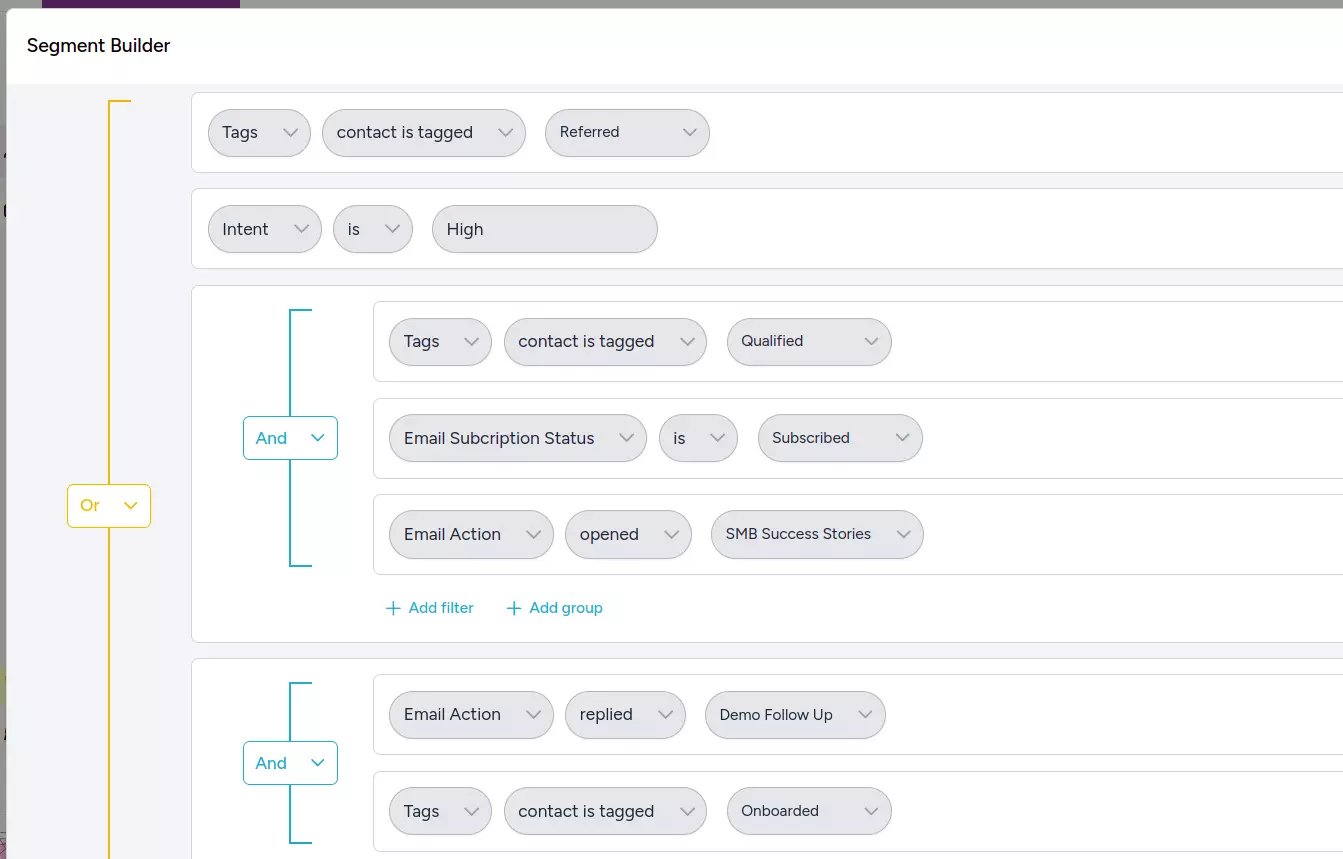
Depending on the segment's condition AND or OR logic, a contact will or will not join a segment.
Where the segment builder appears
The same builder defines "which contacts" everywhere the product needs it. The categories, operators, time windows, and grouping rules are identical in each location:
- Saved segments under Audience → Segments — reusable groups of contacts.
- Criteria Match trigger — inline criteria, no saved segment needed.
- Cyclic trigger — the criteria that filter who is processed at each tick.
- If/Else process — the branching condition.
- Multi-way Split process — each branch's condition.
- Wait Condition action — the condition the journey waits for.
- Custom Event trigger — property conditions only.
Rules and groups
A criteria definition is a tree of rules organized into groups:
- Rule: a single condition (e.g. "Country is Germany").
- Group: a collection of rules — and optionally other groups — joined by a single connector that applies to everything inside it: either AND (every item must match) or OR (any item may match).
The connector is set at the group level, not between individual rules. All siblings inside the same group share the same AND/OR.
Nesting AND and OR
Because a group can contain other groups, AND and OR can be combined to any depth by nesting. To express mixed logic, wrap part of the expression in a sub-group with its own connector. The builder represents this visually as indented blocks — a sub-group appears as a bordered section inside its parent, with its own AND/OR toggle.
Examples of what nesting unlocks:
(Country is Germany OR Country is Austria) AND tag contains "newsletter"— outer group AND, with an inner OR sub-group for the two country rules.(Plan is Pro AND Total visits at least 5) OR (Plan is Free AND Custom event "upgrade_clicked" triggered at least 1 time)— outer group OR with two AND sub-groups, one per scenario.Tag contains "vip" AND ((Email opened at least 3 times in the last 30 days) OR (Custom event "feature_used" triggered at least 1 time in the last 14 days))— outer AND with one leaf rule and an OR sub-group containing two activity rules.
There is no fixed depth limit. In practice, anything more than two or three levels deep is usually a sign that a piece of the criteria should be saved as its own segment and referenced via a Segment Membership rule instead.
Filter categories
The builder offers the following filter categories. The category determines which fields and operators appear next.
| Category | What it filters on |
|---|---|
| Contact Tags | Whether a contact has or doesn't have specific tags. |
| Contact Attributes | Built-in fields (first name, last name, email, website) and any custom attributes defined in the workspace. |
| Language | The contact's language preference. |
| Contact Added Date | When the contact was added to the audience. |
| Email Subscription Status | The contact's marketing-email subscription state. |
| Email Activity | Interactions with marketing emails (sent, opened, clicked, replied, with negations). |
| Web Push Activity | Interactions with web push notifications. |
| Segment Membership | Whether the contact is or isn't a member of another saved segment. |
| Total Visits | Total tracked website visits. |
| Time on Site | Total session duration on the website. |
| Visitor Identification | Whether the contact is identified or anonymous. |
| Page Visited | Specific pages the contact has visited (URL or page title). |
| Entry Page | The first page a session started on. |
| Link Clicked | Specific tracked links the contact has clicked. |
| Custom Events | Events received via the tracking API, optionally filtered by event properties. |
Operators by input type
Operators depend on the data type of the field or attribute being filtered.
By data type
| Data type | Applies to | Operators |
|---|---|---|
| Text | Text custom attributes, first/last name, email, website, page URL strings. | is, is not, contains, does not contain, starts with, ends with, is blank, is not blank |
| Number | Number custom attributes, frequency counts. | is, is not, greater than, less than, is blank, is not blank |
| Boolean | Boolean custom attributes. | is true, is false, is blank, is not blank |
| Timestamp | Timestamp custom attributes, contact added date. | is (exact date), is after, is before, is within (two dates), is blank, is not blank |
| Select | Dropdowns like language and subscription status. | is, is not |
By category
| Category | Operators |
|---|---|
| Tags | contact is tagged with (contains), contact is not tagged with (does not contain) |
| Email subscription status | is / is not one of: Subscribed, Unsubscribed, Non-subscribed, Cleaned |
| Visitor identification | is Anonymous (not linked to a contact) or Identified (linked to a contact record) |
| Segment membership | is member of segment, is not member of segment |
| Time on site | greater than / less than a number of seconds |
| Email Activity | opened, did not open, clicked, did not click, replied, did not reply, sent, was not sent — plus frequency and time window |
| Web Push Activity | sent, was not sent, delivered, did not deliver, clicked, did not click, dismissed, did not dismiss — plus frequency and time window |
Frequency (activity-count rules)
Used for Email Activity, Web Push Activity, Total Visits, Page Visited, Entry Page, Link Clicked, and Custom Events: at least N times, at most N times, exactly N times, and has not triggered (custom events only — the event has never occurred for this contact).
URL / event-name / link matchers
When a rule needs to match a URL, an event name, or a link URL: any (matches any value), is, is not, contains, does not contain, starts with, ends with, regex match.
For Page Visited and Entry Page, page-title matchers are also available: webpage title is, webpage title is not, webpage title contains, webpage title does not contain.
Custom event property
Inside a Custom Event rule (or the Custom Event trigger with Add property conditions on), each property can be filtered using operators that depend on its data type:
| Property type | Operators |
|---|---|
| String | is, is not, contains, does not contain, starts with, ends with, is set, is not set |
| Number | equals, not equals, greater than, less than, between, is set, is not set |
| Boolean | is true, is false, is set, is not set |
| Timestamp | equals, not equals, after, before, between, is set, is not set |
Multiple property conditions can be combined with AND/OR.
Time windows
Activity-based filters (email, web push, website tracking, custom events) accept a time window:
| Option | Behavior |
|---|---|
| over all time | No limit. This is the default. |
| in the last X | Units: days, weeks, months. |
| after | A specific date. |
| before | A specific date. |
| between | Two specific dates. |
For Email Activity and Web Push Activity, the entire rule can be negated (is vs is not).
Built-in contact attributes
Every contact has these fields out of the box:
| Field | Type | Notes |
|---|---|---|
| First Name | Text | — |
| Last Name | Text | — |
| Email Address | Text | — |
| Website | Text | — |
| Language | Select | Supports the full ISO 639-1 language set. |
| Email Subscription Status | Select | Subscribed / Unsubscribed / Non-subscribed / Cleaned. |
| Marketing Status | Select | Marketing / Non-marketing. |
| Contact Added Date | Timestamp | — |
Custom attribute data types
Custom attributes (defined per workspace) can be of these types, each unlocking the operators listed above:
| Type | Description |
|---|---|
| TEXT | String values. |
| NUMBER | Numeric values. |
| BOOLEAN | Yes/no. |
| TIMESTAMP | Date/time values. |
Searchable pickers
Several rule inputs are backed by searchable, paginated dropdowns populated from your workspace data: tags, marketing emails (templates), web push notification templates, saved segments, tracked page URLs, tracked entry-page URLs, tracked link URLs, custom event names, custom event property names, and custom event property values.
Example criteria
A criteria definition reads as a stack of plain-English conditions. Some realistic examples:
- Country is Germany AND tag contains
newsletter. - (Total visits at least 3 in the last 30 days) OR (Email opened at least 2 times in the last 30 days).
- Custom event
purchasetriggered at least 1 time over all time WHERE propertyamountgreater than 100 AND propertycategoryiselectronics. - Email subscription status is Subscribed AND page visited URL contains
/pricingat least 1 time in the last 7 days AND tag is notexisting-customer. - Member of segment
Trial usersAND custom eventfeature_usedhas not triggered in the last 14 days.
Need Immediate Help? Contact our support team at support@spreeflo.com or check our other guides for more information.