Guides
•23 min read
Email Subject Lines: 150+ Examples Sorted by the Job They Do
152 original email subject lines for welcome, onboarding, sale, newsletter, win-back and follow-up emails, each with a character count and why it works.

By Cyril Nie, founder of Spreeflo · Updated 27 October 2026
Published · Updated
Someone filled in your form. What you send in the next hour matters more than anything you send next month.
A sales follow-up email is a short message that picks up where a lead left off: a form fill, a demo request, a call, a quote or a trial. Send the first one within an hour, then two or three more over about two weeks, each with a new reason to reply. Stop when they answer or say no.
This page covers inbound business and sales follow-up emails, not job interviews or cold outreach. Below: timing, cadence, and 25 templates sorted by what the person did.
Within an hour of the lead's action, and sooner if you can. Speed is one part of follow-up that has been measured at scale.
In "The Short Life of Online Sales Leads" (Harvard Business Review, 2011), James Oldroyd, Kristina McElheran and David Elkington sent a web lead to 2,241 US companies. 37% responded within an hour and 23% never responded; among companies that replied within 30 days, the average took 42 hours. The same article reports the authors' separate study of 1.25 million leads received by 42 US companies (29 B2C, 13 B2B): firms that tried to reach a lead within an hour were nearly seven times as likely to qualify it as firms that tried even an hour later, and more than 60 times as likely as firms that waited 24 hours or longer.
The data is from 2011, so treat the multiples as directional. The first reply should go out while the person still remembers your form.
Three to five in total, spread over about two weeks, then stop. Every follow-up after the first needs a new reason to exist: an answer, an example, an easier option or a deadline.
Here's the cadence we'd use. Adjust it to how long your buyers take to decide.
| What the person did | First follow-up | Then | Stop after |
|---|---|---|---|
| Filled in a form or downloaded a guide | Within an hour | Day 3, day 10 | 3 emails |
| Requested a demo | Within minutes, plus a call within the hour | Next day if no time is booked | Demo booked, or 3 emails |
| Had a demo or call | Same day | Day 3, day 10 | 4 emails |
| Missed the meeting | Within 15 minutes | Next day, day 5 | 3 emails |
| Received a quote | Day 2 | Day 5, before the quote expires, day 14 | 5 emails |
| Started a trial | Day 2 if they haven't done the first key step | Based on what they do, plus 3 days before the end | The day after the trial ends |
Keep it under 100 words, ask one question, and refer to what the person actually did.
Name the action. "You downloaded the checklist on Tuesday" beats "I wanted to follow up."
Add something new. If you have nothing new, wait.
Make "no" easy. In our experience, a polite exit gets more replies than a fourth nudge.
Send it from a person, with a reply-to address someone reads.
Fill in the brackets and sign off with your first name.
These five cover a guide download, a contact form, a pricing request, a second touch and a polite close.
1. Guide download, same day
Subject: The checklist you asked for, plus one question

Hi [First name],

Here's the [guide name] you downloaded: [link].

Most people grab it because they're about to [job the guide helps with]. Is that where you are, or are you still weighing options? If it's the first, reply with your setup and I'll point you to the two pages that matter most.
2. Contact form, within the hour
Subject: Got your message about [topic]

Hi [First name],

Thanks for getting in touch about [topic]. I've read it, and I'm the person who'll help.

One question so my answer is useful: [specific question based on what they wrote]?

If it's easier to talk, here's my calendar: [booking link].
3. Pricing request
Subject: Pricing for [Company]

Hi [First name],

You asked about pricing. For a team your size, most customers land on [plan] at [price] a month. The full breakdown is here: [link].

Two things change the number: [factor 1] and [factor 2]. Tell me those and I'll send an exact quote today.
4. Second touch, day 3
Subject: One example for [Company]

Hi [First name],

[A customer like them] used [the idea from the guide] to [result, in plain words]. The short version of how: [one sentence].

Want me to sketch what that would look like for [Company]?
5. Last email, day 10
Subject: Should I close this out?

Hi [First name],

I haven't heard back, which usually means the timing's off. No problem.

I'll stop emailing about this. If [problem] comes back up, reply to this thread and it'll come straight to me.A demo request is usually the hottest lead you'll get. Confirm it, chase an unbooked slot, and set up the meeting.
6. Instant confirmation
Subject: Your demo: one quick question first

Hi [First name],

Thanks for asking for a demo. To make the 30 minutes about [Company] and not a generic tour, can you reply with:

1. What you use today
2. The one thing you'd most like to fix

If you didn't get to pick a time, grab one here: [booking link].
7. Requested but not booked, next day
Subject: Still want that demo?

Hi [First name],

You asked for a demo yesterday, but there's no time on the calendar yet. Three slots that work on my side: [day and time], [day and time], [day and time].

Or reply "async" and I'll send a 5-minute recording built around [their use case].
8. The day before
Subject: Tomorrow at [time]: what I'll show you

Hi [First name],

Based on what you told me, I'll cover [use case 1], [use case 2] and pricing for [team size].

If someone else should join, forward this: [meeting link].In a sales call follow-up email, the recap matters most: it's what the buyer forwards to whoever signs off.
9. Same-day recap
Subject: Recap: [Company] and [your product]

Hi [First name],

Thanks for your time today. What I heard:
- You need [need 1] and [need 2]
- [Constraint] by [date]
- [Decision maker] signs off

Next step we agreed: [step] by [date]. Recording and slides: [link]. Anything I got wrong?
10. Answer an open question, day 3
Subject: Your question about [topic]

Hi [First name],

On [day] you asked whether we could [question]. I checked: [direct answer in one or two lines].

This page shows it step by step: [link].

Does that clear the way for [agreed next step]?
11. Arm your champion
Subject: Something for [decision maker's first name]

Hi [First name],

You mentioned [decision maker] will want to see this. Here's a one-page summary you can forward as is, covering cost, setup time and what changes for the team: [link].

Happy to do a 15-minute call with them if that's faster.
12. Gone quiet, day 10
Subject: Did [priority] move?

Hi [First name],

When we spoke, you wanted [outcome] before [date]. That date is getting closer, so I'm checking whether it's still the plan or something else jumped the queue.

Either answer helps. If it's paused, I'll check back in [month].Make rebooking take one click, and offer a version that needs no meeting at all.
13. Fifteen minutes after
Subject: Missed you just now

Hi [First name],

I was on the call at [time] but didn't see you. Things come up.

Pick a new time here: [booking link]. If a recording would suit you better, reply "recording" and I'll send one today.
14. Next day
Subject: A 5-minute version instead?

Hi [First name],

Here's a shortcut: a 5-minute video on [the thing they asked about]: [link].

If it looks right, the next step is [trial, quote or call].
15. Day 5, last one
Subject: Closing the loop on our call

Hi [First name],

We didn't manage to connect, so I'll take this off my list. If [problem] is still on yours, the booking link stays open: [link].
See it in Spreeflo: a demo-request form can start a journey that sends template 6, gives the lead an owner with Assign owner and puts a call task in that owner's My queue, before anyone has opened their inbox. Try the journey builder, no login →
Once a quote is out, your job is to remove reasons to wait. Each of these gives the buyer something new.
16. Sending the quote
Subject: Your quote for [scope]: [amount]

Hi [First name],

Here's the quote for [scope]: [link]. Total: [amount], valid until [date].

It includes [the two things they cared most about]. It doesn't include [thing they might assume], which would be [price] if you need it.

What would you change?
17. Day 2: did it land?
Subject: Any questions on the quote?

Hi [First name],

People usually ask about [question 1] or [question 2], so here are the short answers: [answer 1]. [answer 2].

Anything else before you take it to [decision maker]?
18. Day 5: give them options
Subject: Three ways to go ahead

Hi [First name],

If the full quote is more than you need right now, here are the options:
1. As quoted: [amount]
2. [Smaller scope]: [amount]
3. Start with [first phase] in [month]

Reply with a number and I'll update the paperwork.
19. Before it expires (only if the deadline is real)
Subject: Your quote expires on [date]

Hi [First name],

A heads-up that the price in your quote holds until [date]. After that, [what changes].

If your timing has slipped, tell me the new date and I'll reissue it.
20. Day 14: the breakup
Subject: Should I take this off your desk?

Hi [First name],

I haven't heard back on the quote, so I'm guessing the timing moved, the price didn't fit, or you went another way.

A one-word reply (timing, price or other) would really help. Either way, thanks for considering us.Trial follow-ups should react to what the person did in the product, not just the calendar.
21. Day 2, first step not done
Subject: Stuck on [first setup step]?

Hi [First name],

You signed up two days ago but haven't [first key action] yet. It's where most people get stuck, so here's the shortcut: [link to a 2-minute guide].

Or reply with what you're trying to do and I'll help you set it up.
22. First step done, then nothing
Subject: You [did the key action]. Here's what's next

Hi [First name],

You [completed key action] on [day]. Nice. People who get the most from [product] usually [next action] next, because [benefit].

Here's how, in under five minutes: [link].
23. No login for a week
Subject: Is [product] still useful to you?

Hi [First name],

You haven't logged in since [date]. What got in the way: [likely reason 1], [likely reason 2], or something else? One line back is plenty.
24. Three days before the trial ends
Subject: Your trial ends on [date]

Hi [First name],

So far you've set up [usage summary], and it all stays if you pick a plan: [link].

Need more time to test [the thing they haven't tried]? Reply and I'll see what I can do.
25. Trial ended, no plan
Subject: What would have made it a yes?

Hi [First name],

Your trial ended yesterday. I'd love one sentence on why it wasn't a fit: price, a missing feature, or timing?

Your setup is saved for [number] days if you come back.Automate the timing and the checking, and let a person send the emails that need judgment. The first reply and every "did they engage?" check can be automatic; recaps and quote conversations go out by hand from the owner's inbox.
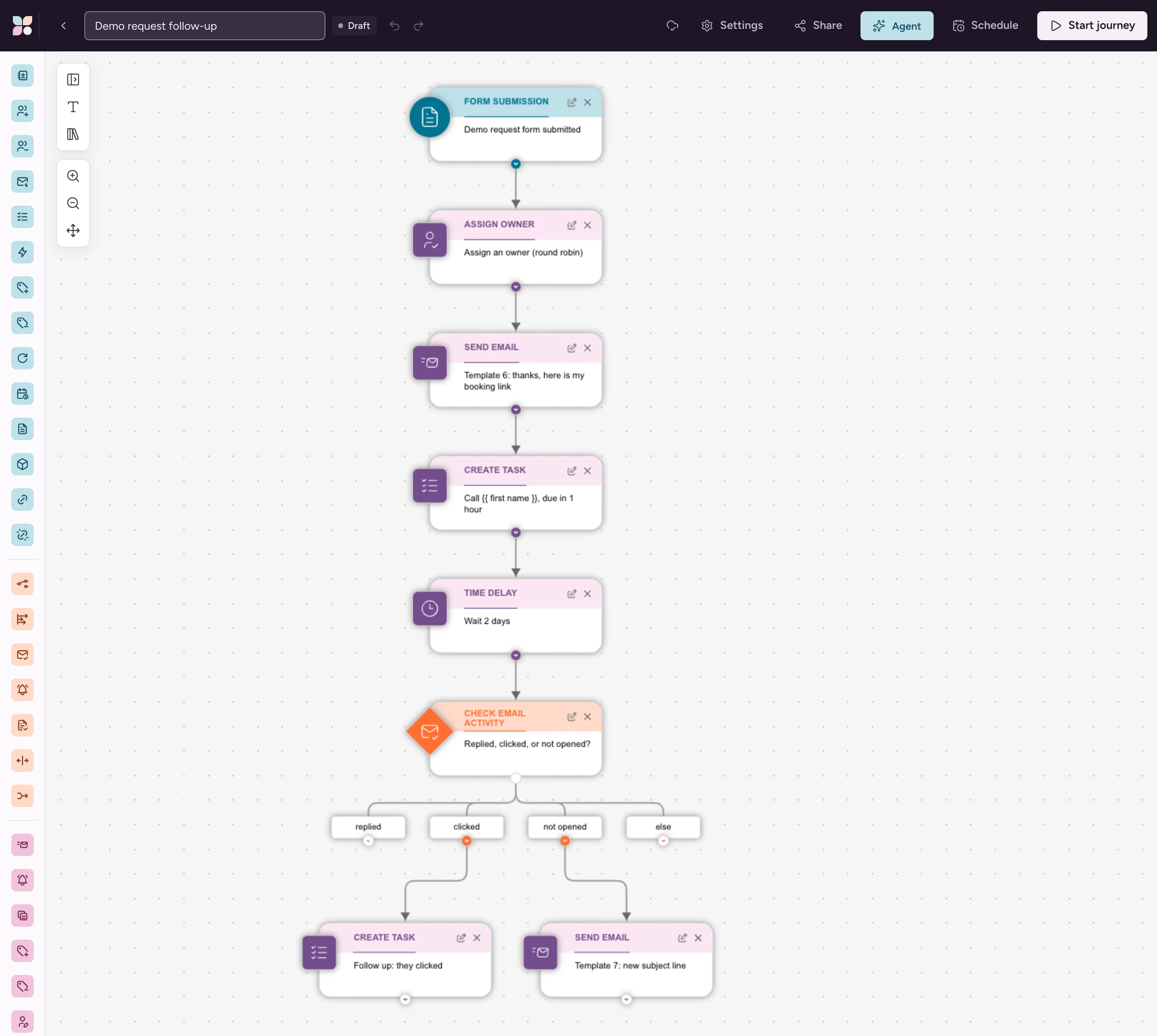
Here's how that splits in Spreeflo, for a demo-request form:
Trigger on the form and pick an owner. A Form Submission journey starts the moment the demo form is submitted. Assign owner gives the lead to a specific member on Starter; on Professional it can also share leads out by round robin.
Reply straight away. Send Email sends template 6, signed by the owner with {{ owner.first_name }} and offering their booking link with {{ owner.booking_url }}.
Queue the personal touch. Create task adds "Call {{ contact.first_name }}" to the owner's My queue, due in an hour. An Email task opens a 1:1 email to the contact, sent from the owner's own address, and the reply threads onto the contact's timeline.
Only chase people who didn't engage. After a Time Delay, Check Email Activity splits contacts by what they did with the first email: anyone who replied leaves the flow, clickers get a task for the owner, and people who didn't open get template 7 with a new subject line.
Hold yourself to a response time. On Professional, a speed-to-lead SLA sets "first touch within" a number of minutes or hours for a lifecycle stage (set the stage in the same journey with Update Contact Attribute). A breach notifies the owner and moves the lead to the top of My queue.
When a small team loses a deal on follow-up, it's rarely the writing. It's the reply that went out on day three, or the quote nobody chased. Write your follow-ups once, decide the timing once, and let a system do the remembering.
Spreeflo runs follow-ups from the same contact record as your forms, emails and CRM: journeys that send the first reply instantly, owners and tasks for the personal touches, and speed-to-lead SLAs on Professional. Starter is from $16 a month for one seller, CRM included; Professional is from $24 for a team.
Take the live tour → · See pricing
Within an hour of the lead's action. In the 2011 Harvard Business Review research above, firms that tried to contact a lead within an hour were nearly seven times as likely to qualify it as firms that tried even an hour later.
For an inbound lead, three to five emails over about two weeks is plenty, as long as each adds something new. Then send a polite close and stop; extra emails risk spam complaints that hurt your sending reputation.
Mention what the person did, add one useful thing, and ask one question they can answer quickly. Give them an easy way to say "not now", and keep it under 100 words.
Skip "I just wanted to follow up" and name what the person did instead: "You downloaded the checklist on Tuesday" or "On Thursday you asked whether we could connect your store". Then add one new thing, like an answer, an example or an easier option, and close with a single question they can answer in a line.
When there's no response, don't repeat the last email. Offer something new, like a short video or a smaller option. If two follow-ups get no reply, send a short close ("Should I close this out?") that makes a one-word reply easy.
Automate the first reply and the timing checks, because those are what people forget. Keep demo recaps and quote conversations as personal emails from the owner, and automate the reminder to send them.
MQL vs SQL: the difference, the handoff, and how to automate it
HubSpot lead scoring: how it works, what it costs, and a simpler setup
Business email subject lines: 80 examples for every kind of work email
SmartCompany: "Are you letting online leads go cold?", 1 July 2011, quoting the authors' article "The Short Life of Online Sales Leads" (2,241 US companies, 37% within an hour, 23% never, 42-hour average, the separate 1.25 million lead study at 29 B2C and 13 B2B companies), read 27 October 2026
BYU ScholarsArchive: "The Short Life of Online Sales Leads", Oldroyd, McElheran and Elkington, Harvard Business Review vol. 89, issue 3, 2011 (authors and publication details), read 27 October 2026
Spreeflo pricing, read 27 October 2026
Discover more insights on similar topics
152 original email subject lines for welcome, onboarding, sale, newsletter, win-back and follow-up emails, each with a character count and why it works.
80 business email subject lines for introductions, meetings, proposals, invoices, follow-ups and updates, each with a character count and the situation it fits.
60 original sales email subject lines for inbound deals, sorted by stage: demo requests, trials, proposals and renewals, each with its character count.