Guides
•23 min read
Email Subject Lines: 150+ Examples Sorted by the Job They Do
152 original email subject lines for welcome, onboarding, sale, newsletter, win-back and follow-up emails, each with a character count and why it works.

By Cyril Nie, founder of Spreeflo · Prices and plan details checked on HubSpot's own pages on 27 October 2026
Published · Updated
HubSpot's lead scoring is good. The catch is the plan you need to get it.
HubSpot lead scoring gives contacts a fit score (who they are), an engagement score (what they've done) or a combined score, from rules you set. Contact scoring needs Marketing Hub Professional or Enterprise. Professional starts at $800 a month paid annually, or $890 paid monthly on an annual commitment, plus a required $3,000 onboarding fee, with 3 seats, 2,000 marketing contacts and up to 5 scores.
You build a score from groups of rules that add or subtract points when a contact matches. HubSpot keeps it current and saves it as a property for segments, workflows and reports. Its lead scoring tool offers three score types for contacts and companies:
| Score type | Built from | Example rules |
|---|---|---|
| Fit | Property values | Job title, company size, annual revenue |
| Engagement | Events | Site visits, newsletter sign-ups, CTA clicks, email opens |
| Combined | Both | Creates three score properties instead of one |
Limits. A score limit caps the total and group limits weight each group; once a limit is reached, no more points are added or removed.
Negative points. Rules can subtract points, and a score can go below zero.
Frequency and time frames. Event rules can count occurrences (exactly, between, at least, at most) or look only within a time frame.
Decay. Engagement and combined event groups can decay over 1, 3, 6 or 12 months, in a straight line.
Thresholds. Fit and engagement scores are labelled High, Medium or Low. Combined scores use an A1 to C3 grid: the letter is fit (A is high), the number engagement (1 is high).
AI scores. AI-built contact fit and engagement scores need Marketing Hub Enterprise and at least 50 contacts, 25 converted and 25 not.
Lead scoring is on Professional and Enterprise only. From HubSpot's pricing pages and knowledge base, read on 27 October 2026:
| Plan | Price | Lead scoring | What it scores | Onboarding |
|---|---|---|---|---|
| Marketing Hub Free | $0 | Not included | None | |
| Marketing Hub Starter | From $7 or $20 per seat a month | Not included | None | |
| Marketing Hub Professional | From $800 a month (paid annually) or $890 (paid monthly, annual commitment); 3 core seats and 2,000 marketing contacts included | Up to 5 scores | Contacts, companies | $3,000, required |
| Marketing Hub Enterprise | From $3,600 a month; 5 core seats and 10,000 marketing contacts included | Up to 50 scores, with AI recommendations | Contacts, companies | $7,000, required |
| Sales Hub Professional | From $90 or $100 per seat a month | Up to 5 scores | Companies, deals | $1,500, required |
| Sales Hub Enterprise | From $150 per seat a month | Up to 10 scores | Companies, deals | $3,500, required |
HubSpot's pricing page shows two figures each for Starter and Professional beside "Pay Monthly" and "Pay Annually", and Professional's "Pay Monthly" is marked "Commit annually", so both are one-year contracts. HubSpot's own Marketing Hub pricing guide (September 2026) gives Professional at $800 billed annually and $890 monthly. Extra Marketing Hub Professional seats start at $45 a month.
So the cheapest way to score contacts, Marketing Hub Professional, costs in the first year $800 × 12 + $3,000 = $12,600 paid annually, or $890 × 12 + $3,000 = $13,680 paid monthly, for 2,000 marketing contacts and three seats.
Setup is a short wizard, per HubSpot's knowledge base:
Go to Marketing > Lead Scoring (under More) and click Create score.
Choose Contacts (Marketing Hub), Companies or Deals (Sales Hub), then fit, engagement or combined.
Use + Add property group for fit rules and + Add event group for engagement rules; engagement and combined scores also offer Discover AI rules.
Set the Score limit (for example -100 to 100) and each group's maximum, then build the rules and points, optionally capping how often an event scores.
Choose Score all or Score specific segments, and set Score thresholds on the Settings tab.
Test records or preview the distribution, then Review and turn on.
Two scores, each capped at 100: Fit (could they buy?) and Intent (are they interested now?). A contact becomes a marketing qualified lead (MQL) when both pass 50. It works in HubSpot as a combined score and in most other tools as two scores.
Fit rules (who they are)
| Rule | Points |
|---|---|
| Job title contains founder, CEO, owner or head of marketing | +30 |
| Company size between 2 and 50 employees | +25 |
| Country is one you sell to | +25 |
| Has a work email (linked to a company, not a free-mail address) | +20 |
| Email domain belongs to a competitor | -50 |
Intent rules (what they've done), all in a rolling window
| Rule | Points |
|---|---|
| Submitted the demo or contact form in the last 30 days | +45 |
| Clicked any email at least twice in the last 30 days | +20 |
| Replied to any email in the last 30 days | +20 |
| Visited the pricing page at least twice in the last 14 days | +15 |
| Opened no email in the last 60 days | -20 |
Rolling windows make intent fade on its own: a contact who went quiet a month ago drops back without a reset. A demo request is worth almost half the intent score because it's the clearest signal you'll get; you could also route demo requests straight to a person.
The leads are illustrative; the math follows the rules above.
| Lead | Fit | Intent | Result |
|---|---|---|---|
| Founder of a 12-person UK agency, work email; visited pricing 3 times this week, clicked 2 emails | 30 + 25 + 25 + 20 = 100 | 20 + 15 = 35 | Strong fit, not ready. Keep nurturing |
| Marketing manager at a 30-person US SaaS, work email; asked for a demo, replied to the confirmation | 0 + 25 + 25 + 20 = 70 | 45 + 20 = 65 | MQL. Owner calls today |
| Student on a free-mail address in a country you sell to; downloaded a guide, opened nothing since | 25 | -20 (0 where scores can't go below zero) | Not a lead for sales. Newsletter only |
Notice the first lead. A model that added both scores would give them 135, the same as the second lead. Separate scores show they're the right buyer at the wrong moment: a nurture email, not a sales call.
Start at 50 for "worth a look" and 75 for "act today", then score the last 20 people who bought: if most would have crossed your MQL line before buying, the threshold works; if not, lower it or fix the rules. Revisit it every quarter, and ask sales which MQLs they rejected and why.
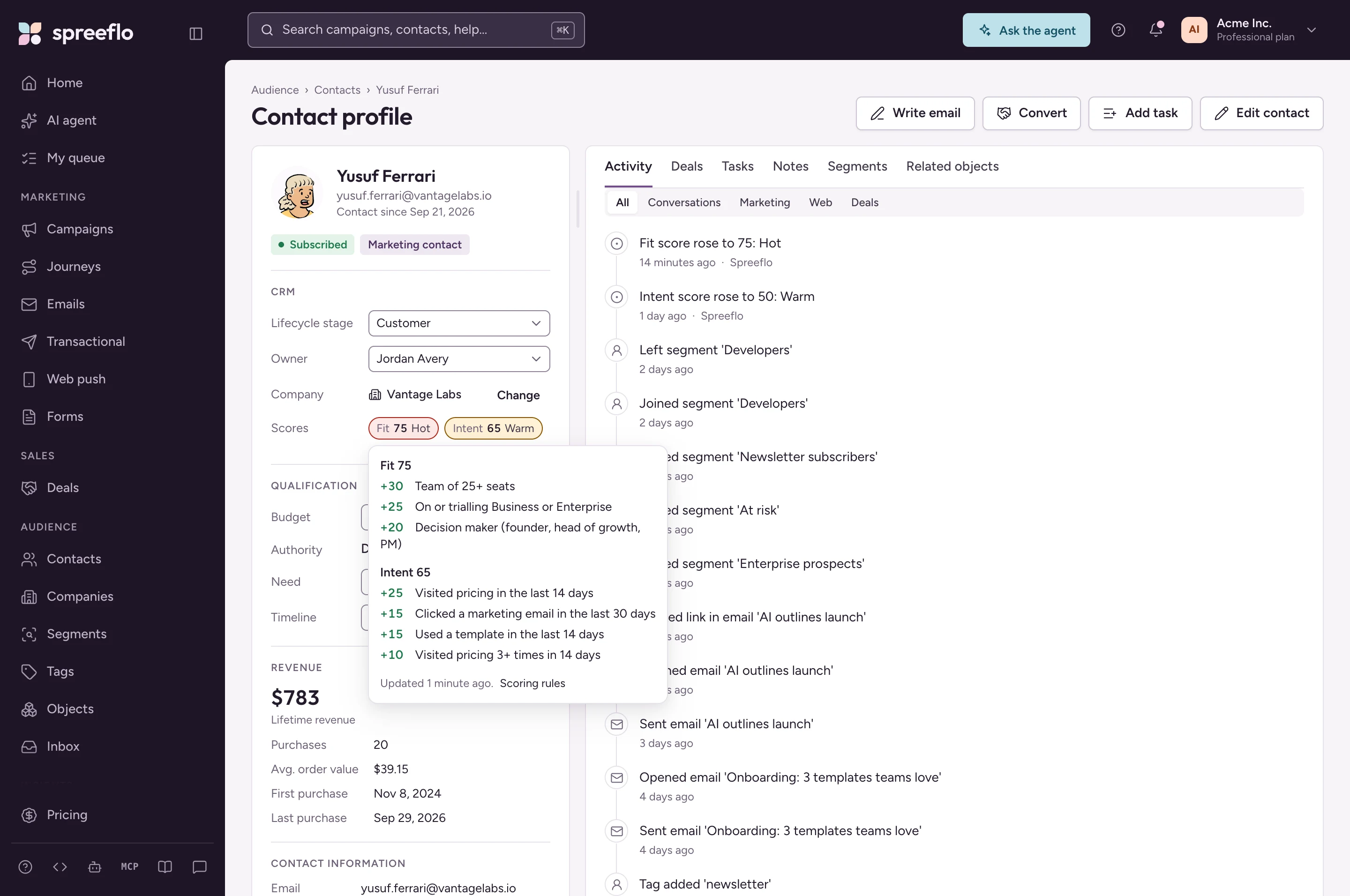
Spreeflo's lead scoring uses the same shape: a Fit and an Intent score per contact, each from 0 to 100, in the CRM on both paid plans.
How the rules work. Each rule is a segment-builder condition plus points, from -100 to +100, with up to 25 rules per score. The model above maps across:
Job title is a custom attribute, filled from a form question with Map to attribute.
"Has a work email" becomes "is related to a Company" (Spreeflo links contacts to a company by work-email domain, skipping free mail), and company size becomes "is related to a Company where Size is 2-10 or 11-50".
The competitor rule uses the email domain, seeded from the CRM setup questions.
The demo form is a Form Action condition; email clicks and replies are Email Action conditions ("at least 2 times in the last 30 days").
The pricing-page rule is a Page Visited condition, which needs Professional. On Starter, website-activity rules score 0, so a Starter model relies on forms, email activity and profile data.
There's no separate decay setting: when a click falls outside "the last 30 days", its points drop away.
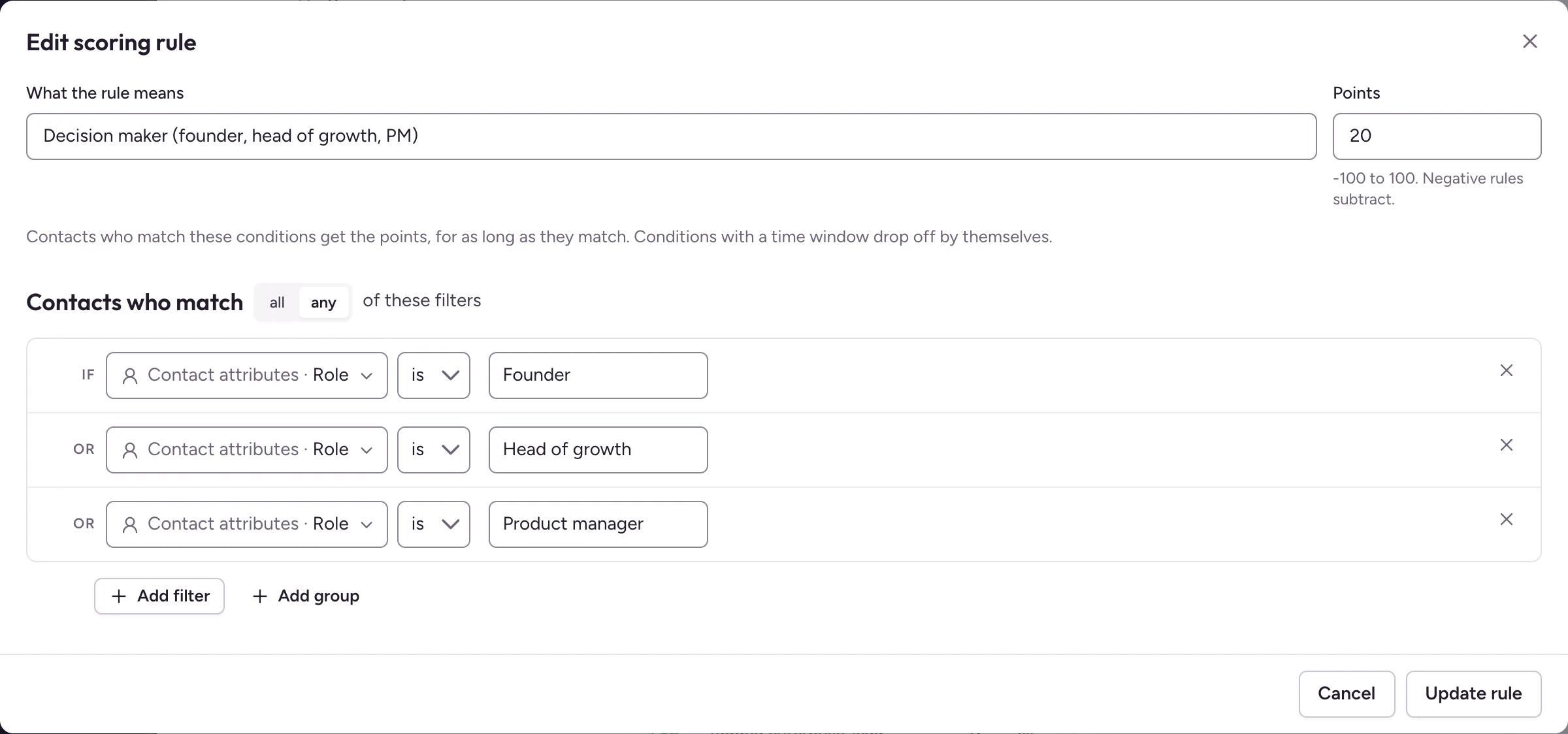
Bands and using the scores. Warm is 50 and Hot is 75 by default; crossing a band writes to the timeline and can start a journey. Scores are contact attributes (fit_score, intent_score), so they work in any segment, If/Else or Join Segment trigger, such as one that sets the lifecycle stage to MQL with Update Contact Attribute and assigns an owner with Assign owner.
HubSpot is the better choice if you need more than two scores (Enterprise allows up to 50), scores on companies and deals, AI-built scores (Enterprise), configurable decay or the A1 to C3 grid. If your team already runs on HubSpot, keeping scoring there avoids a second system.
Spreeflo's version is simpler: one Fit and one Intent score, with rules you write yourself (no AI-suggested rules). For a founder-led team that wants a clear MQL line and fast follow-up, we think that's enough. At the 2,000 marketing contacts HubSpot's Professional price includes, Spreeflo Professional, which adds scoring on website activity and unlimited seats, is $32 a month, or $320 a year billed annually, with no onboarding fee, against $12,600 for HubSpot's first year on annual billing. Starter, with Fit and Intent scoring on email, form and profile data, is $21 a month at 2,000 contacts for one seller.
See it in Spreeflo: open any contact in the tour to see its Fit and Intent scores and, under "Why these scores", every rule that matched. Click around a live CRM in the tour →
Spreeflo gives founder-led teams Fit and Intent lead scoring on the same record as their email, forms and deals. Starter is from $16 a month for one seller, CRM included; Professional, from $24, adds scoring on website activity, round-robin routing and speed-to-lead SLAs.
Take the live tour → · See pricing
No. It isn't in HubSpot's free tools or Starter plans. The cheapest way to score contacts is Marketing Hub Professional: $12,600 in the first year on annual billing, including the required onboarding fee.
Yes, on Marketing Hub Enterprise, where it's called AI scoring: HubSpot trains a model on which of your contacts converted and which didn't, then builds the contact fit or engagement score. It needs at least 50 contacts, 25 converted and 25 not. On Professional, scores come from rules you set.
A fit score measures who someone is: role, company size, country. An engagement score measures what they've done: visits, clicks, form fills, usually weighted towards recent activity. Keeping them separate tells you whether a lead is the wrong buyer or the right buyer at the wrong time.
MQL vs SQL: the difference, the handoff, and how to automate it
Sales follow-up emails that get replies: 25 templates for leads, demos and quotes
HubSpot Knowledge Base: Understand the lead scoring tool, read 27 October 2026 (score types, limits, decay, thresholds, AI scores, subscriptions by object)
HubSpot Knowledge Base: Build lead scores, read 27 October 2026 (setup steps, required subscriptions)
HubSpot: Lead scoring product page, read 27 October 2026
HubSpot Marketing Hub pricing, read 27 October 2026 (plan prices, seats, contacts, onboarding fees, "Up to 5 scores" and "Up to 50 scores")
HubSpot Sales Hub pricing, read 27 October 2026 (seat prices, onboarding fees, "Up to 5 scores" and "Up to 10 scores")
HubSpot: Marketing Hub pricing guide, updated 14 September 2026 (Professional at $800 a month billed annually, $890 billed monthly), read 28 October 2026
Spreeflo pricing, read 27 October 2026
Discover more insights on similar topics
152 original email subject lines for welcome, onboarding, sale, newsletter, win-back and follow-up emails, each with a character count and why it works.
80 business email subject lines for introductions, meetings, proposals, invoices, follow-ups and updates, each with a character count and the situation it fits.
60 original sales email subject lines for inbound deals, sorted by stage: demo requests, trials, proposals and renewals, each with its character count.