Klaviyo costs $150 and Mailchimp $135 a month at 10,000 contacts; Klaviyo wins on ecommerce flows, Mailchimp on price and simplicity.
By Cyril Nie, founder of Spreeflo · Prices from Mailchimp's and Klaviyo's own pages and independent 2026 price breakdowns, checked on 27 October 2026
Published · Updated
Most online stores shortlist these two, and the Klaviyo vs Mailchimp choice turns on how much revenue comes from automated flows.
At 10,000 contacts, Klaviyo's email plan costs $150 a month and Mailchimp Standard $135 (Mailchimp Essentials is $110 but can't branch). Klaviyo is the deeper ecommerce tool: 60+ prebuilt flows, segments on browsing and purchase history, and predictive data like churn risk. Mailchimp is cheaper at most list sizes and simpler for newsletters and small stores.
Mailchimp Standard
$135/month
10,000 contacts
branching flows
5 users
Klaviyo Email
$150/month
10,000 active profiles
60+ prebuilt flows
predictive segments
Prices on monthly billing, checked 27 October 2026
At 10,000 contacts
Mailchimp Standard
Klaviyo Email
Monthly price
$135
$150
One year on monthly billing
$1,620
$1,800
Who you pay for
Every contact, including unsubscribed and non-subscribed
Every profile you can email, whatever its consent status
Emails included a month
120,000 (12x contacts)
About 100,000 (10x profiles)
Branching flows
Yes
Yes, on every plan
Prebuilt ecommerce flows
Abandoned cart, back-in-stock and more via store integrations
60+ flow templates
Predictive segments
Yes
Yes (CLV, churn risk, next order date), once you have the order history
This is Klaviyo vs Mailchimp pricing at each list size.
So is Klaviyo more expensive than Mailchimp? Mailchimp Essentials is cheaper at every list size. Against Mailchimp Standard, the like-for-like plan with branching flows, Klaviyo ties at 500 and 5,000 contacts, is cheaper at 1,000, and costs more from 10,000 up: 11% more at 10,000 and 60% more at 50,000.
Contacts
Mailchimp Essentials
Mailchimp Standard
Mailchimp Premium
Klaviyo Email
Klaviyo Email + SMS
500
$13
$20
$350
$20
$35
1,000
$26.50
$45
$350
$30
$45
5,000
$75
$100
$350
$100
$115
10,000
$110
$135
$350
$150
$165
25,000
$270
$310
$620
$400
n/a
50,000
$385
$450
$815
$720
$735
Monthly billing, US dollars, from independent breakdowns (neither vendor prints its tiers). Mailchimp: starting prices and the $385 Essentials tier from its plan comparison; other tiers from Email Tool Tester (August 2026) and Email Vendor Selection (September 2026), which agree at every size both list. The 1,000-contact row is Email Vendor Selection's 1,500 tier, which on Mailchimp's slider covers 501 to 1,500 contacts. Klaviyo: Email prices from Email Tool Tester (August 2026) up to 10,000 and Automation Atlas (July 2026) at 25,000 and 50,000; they agree at 500 and 5,000. Email + SMS prices are Email Tool Tester's, which lists no 25,000 tier.
These are the billing rules that change what you pay.
Mailchimp counts unsubscribed contacts (Mailchimp help). Archived, cleaned and deleted contacts don't count, so archiving unsubscribes keeps the bill down.
Klaviyo counts every emailable profile, whatever its consent status (Klaviyo billing help). Suppressed profiles don't count, but a shopper who left an email at checkout without opting in can.
Going over: Mailchimp bills overages automatically; Klaviyo moves you up a tier from the next billing cycle, and for sends you choose flexible overages, auto-upgrade, or stop sending.
Discounts. Mailchimp takes 15% off the first 12 months for 10,000+ contacts and 15% for nonprofits. We found no published discount on Klaviyo's pages.
SMS costs extra on both. Klaviyo bills texts separately as a committed monthly spend; Mailchimp sells expiring monthly credit blocks in select countries.
This is how their automation flows compare.
Flows
Mailchimp
Klaviyo
Plan limits
Essentials: up to 4 flow steps, no branching. Standard and Premium: up to 200 flows, branching, multiple starting points
Same features on every plan; flows are available on the free plan too
Prebuilt flows
Welcome, abandoned cart and back-in-stock through the Shopify integration
60+ templates, including abandoned cart, browse abandonment, price drop and back-in-stock
Store triggers
Connected store or API 3.0 integration
Started checkout, viewed a product, placed an order, price drop, predicted next order
Splits
Branching points on Standard and up
Conditional splits on cart value, VIP status, new vs returning, location, lifetime value
Testing
A/B testing from Essentials, multivariate from Standard
A/B tests on send times, channels, content and discount offers
Mailchimp's classic abandoned cart series sends at one hour, one day and three days by default, one per store, for paid accounts that created one before (Mailchimp). Klaviyo's can split on cart value, mix email and SMS, and A/B test a discount on any paid plan.
This is how segmentation differs.
Mailchimp has basic segmentation on Free and Essentials, advanced and predictive segments on Standard and Premium (Mailchimp).
Klaviyo segments in real time on browsing, purchase history, channel preferences and custom properties (Klaviyo), and predicts lifetime value, churn risk and next order date. Predicted lifetime value needs at least 500 customers who have ordered, 180 days of order history with orders in the last 30 days, and some customers with three or more orders (Klaviyo help), so new stores wait.
This is what reviewers say about each.
Klaviyo scores higher on G2; on Trustpilot both score poorly, over billing and support.
Reviews (read 27 October 2026)
Mailchimp
Klaviyo
G2
4.3 / 5 from 12,995 reviews
4.6 / 5 from 1,370 reviews
Trustpilot
2.5 / 5 from 1,550 reviews
1.6 / 5 from 370 reviews
Share of 1-star reviews on Trustpilot
66%
57%
Replies to negative Trustpilot reviews
91%
Hasn't replied, per Trustpilot
On G2, Klaviyo's top downsides are price, the learning curve and missing features. Its Trustpilot complaints center on unexpected charges, including for dormant profiles, and slow support. Mailchimp's Trustpilot complaints center on hard-to-reach support, locked accounts and charges after cancelling.
This is which one fits which store.
Pick Klaviyo if most revenue runs through a store platform like Shopify, you want browse abandonment, price-drop and back-in-stock flows ready-made, email and SMS in one flow, or you have the order history for predictive segments.
Pick Mailchimp if you send newsletters as much as flows, want a cheaper bill as the list grows, or run a small store needing standard welcome, abandoned cart and back-in-stock emails. Any branching flow needs Standard, not Essentials.
Move the slider to see your yearly bill on both.
Static fallback:
One year on monthly billing
1,000 contacts
10,000 contacts
50,000 contacts
Mailchimp Essentials
$318
$1,320
$4,620
Mailchimp Standard
$540
$1,620
$5,400
Klaviyo Email
$360
$1,800
$8,640
Klaviyo Email + SMS
$540
$1,980
$8,820
Mailchimp's first-year 15% discount, where you qualify, takes Standard to $1,377 at 10,000 contacts and $4,590 at 50,000. Klaviyo's texts are billed on top.
Bonus: run the same cart recovery flow for $76 a month at 10,000 contacts.
Both tools bill for people you may not market to. Spreeflo bills only marketing contacts (one-off buyers who never opted in are stored free), and its cart recovery flow triggers on store events (Professional, unlimited seats). Honest caveat: no Shopify integration (forms still embed on Shopify) and no SMS; your store sends events through Spreeflo's website SDK (a JavaScript snippet) or API.
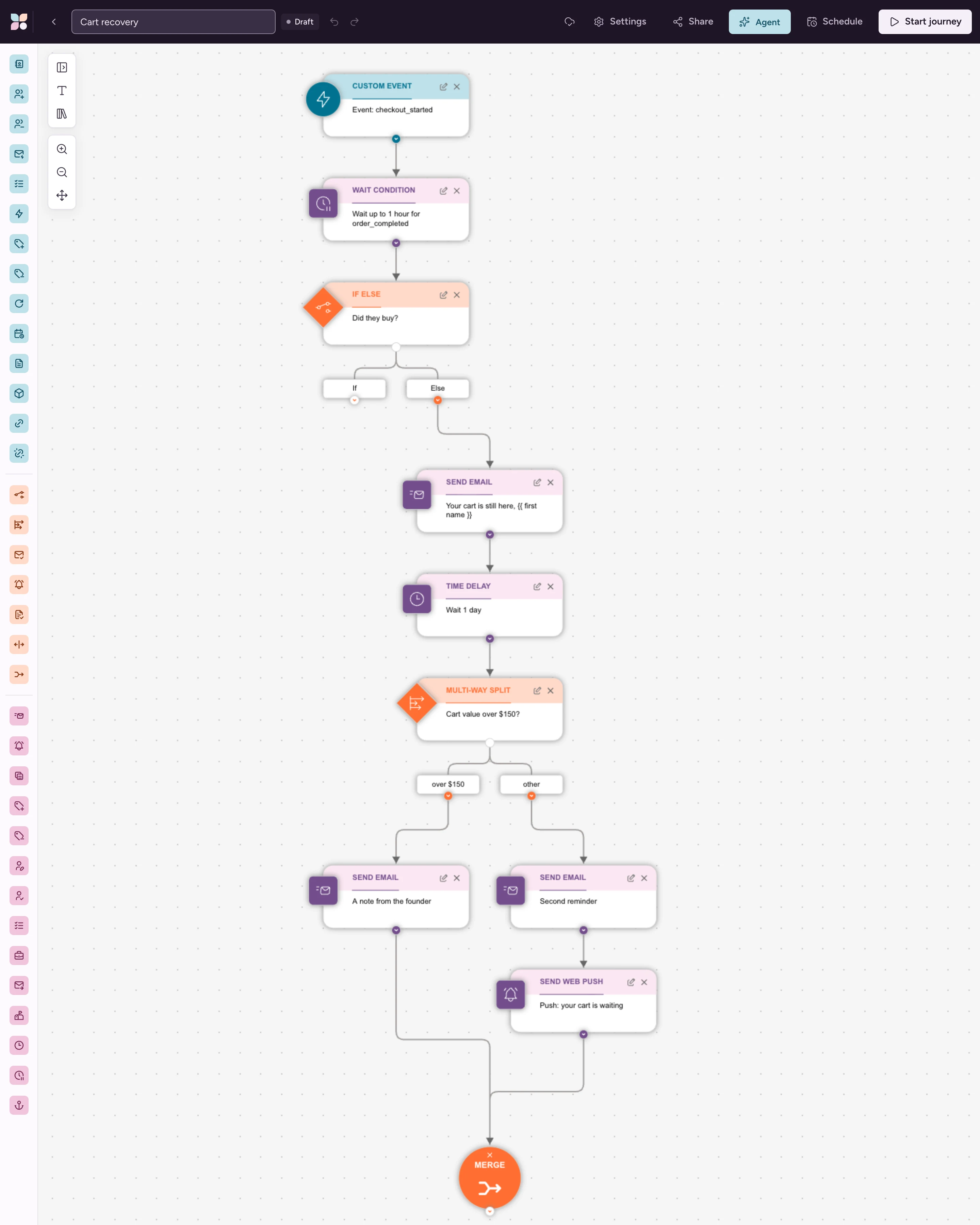
Send the events. When an identified shopper starts checkout, call Spreelytics.track("checkout_started", {...}, { cart_url: "...", cart_value: 84 }); the third argument saves the cart link and value on the contact. Fire order_completed when they buy.
Trigger on checkout with a Custom Event trigger on checkout_started, Re-enrollment on.
Wait up to an hour for the purchase. A Wait Condition on order_completed (at least 1 time in the last 1 day, one-hour timeout), then an If/Else that exits buyers.
Send the reminder. A Send Email: Your cart is still here, {{ contact.first_name | default: "there" }}, with a button to {{ contact.cart_url }}.
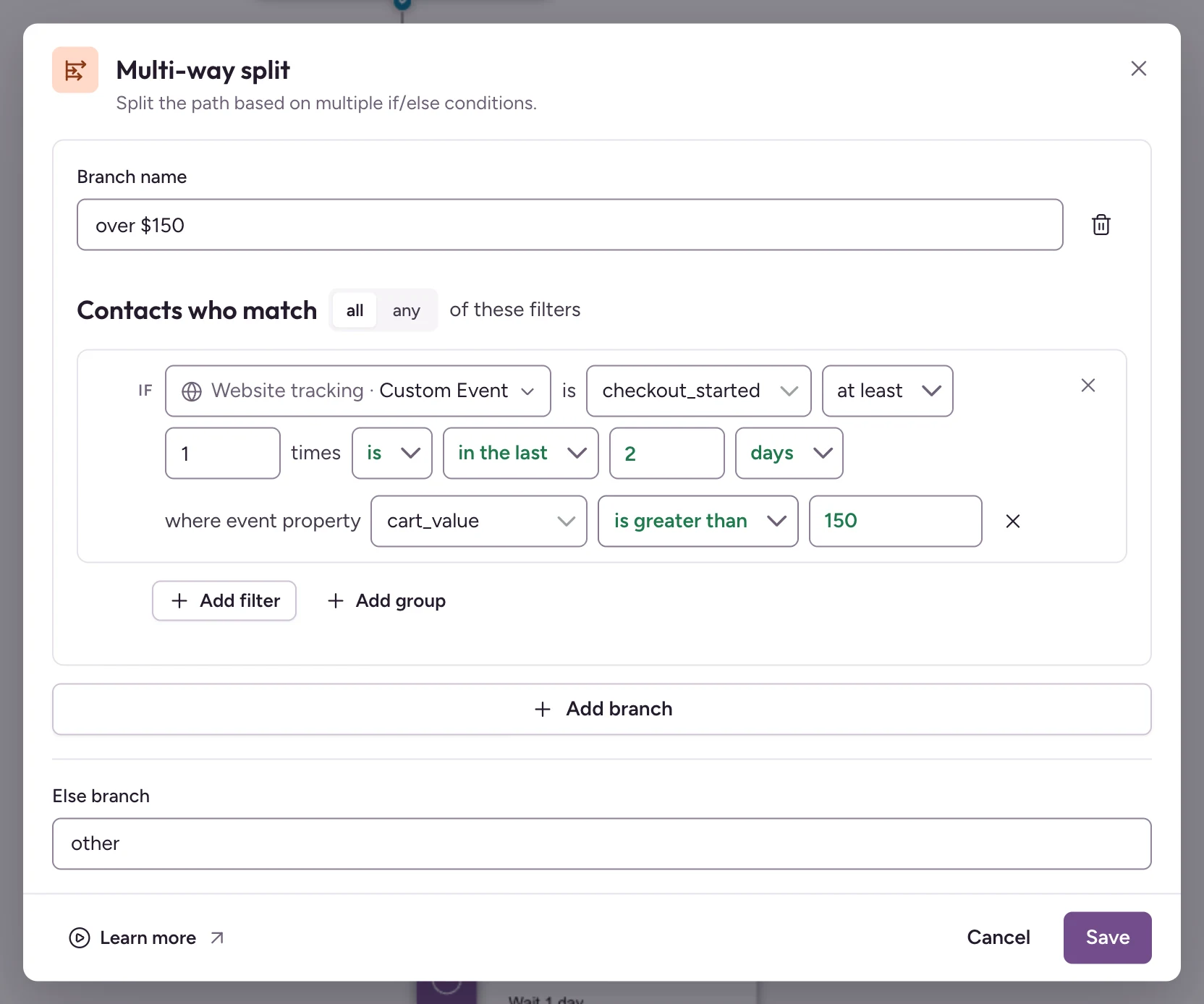
Wait a day, then split on cart size. A Multi-way Split on cart_value sends carts over $150 a personal note from the founder and the rest a second reminder; Send Web Push reaches shoppers who opted in to browser alerts.
One last nudge. Two days later, a final order_completed check, a last email, then a Merge. Connect Stripe or Paddle to see attributed revenue.
Monthly price
1,000 contacts
10,000 contacts
50,000 contacts
Spreeflo Professional (unlimited users)
$24
$76
$384
Mailchimp Standard (5 users)
$45
$135
$450
Klaviyo Email
$30
$150
$720
Prices from Spreeflo's pricing ($760 a year paid annually at 10,000), with no per-email overage. The other two stay ahead on Klaviyo's predictive segments, prebuilt store flows and SMS, and native Shopify apps. Migration is free while slots last.
Spreeflo Professional runs flows on your store events, with forms, segments, web push and revenue attribution on one record, and you pay only for contacts you market to.
These are the questions people ask about Mailchimp vs Klaviyo.
Is Klaviyo better than Mailchimp?
For a store that lives on automated flows, usually yes: 60+ prebuilt flows, splits on cart value and lifetime value, and predictive segments once you have the order history. For newsletters, small stores and tighter budgets, Mailchimp does the job for less.
Can I use Klaviyo and Mailchimp together?
You can connect both to the same store, but each bills for the same contacts, so every shared subscriber costs twice, and two sets of flows can email the same person. In our view, pick the one that matches where your revenue comes from.
Is Klaviyo or Mailchimp better for Shopify?
Klaviyo, for most stores that rely on automated flows: they trigger on store events like started checkout, viewed product and price drop, and G2's review summary highlights its Shopify integration. Mailchimp's own Shopify app covers welcome, abandoned cart and back-in-stock, and costs less.
How hard is it to switch from Mailchimp to Klaviyo?
Contacts move by CSV or sync from your store via Klaviyo's ecommerce integrations; flows and templates must be rebuilt. Count your emailable profiles first, because Klaviyo bills on all of them.